What’s actually slowing this PC down?
Pick the symptom - the matching free tool is one click away.
ThatPainter is reader-supported. When you buy through links on our site, we may earn an affiliate commission. Learn More
The best projector for an artist depends less on having the highest resolution than on matching brightness, projection distance, image size, and portability to the job. For most artists, the Artograph Inspire 1500 is the strongest purpose-built choice. Choose the Artograph Flare 500 for a more portable dedicated art projector, the Caydo M1C for small canvases in dim studios, the BenQ GV50 if you also want a general-purpose portable projector, or the Epson EX3290 when mural-scale brightness matters most.
As an Amazon Associate I earn from qualifying purchases.
Those recommendations are not interchangeable. A projector that is excellent for tracing a small canvas may be too dim for a large mural, while a bright presentation projector may be cumbersome for quick studio work.
Quick comparison
| Projector | Best for | Type | Resolution | Brightness claim | Battery | Main drawback |
|---|---|---|---|---|---|---|
| Artograph Inspire 1500 | Most regular tracing and enlargement | Purpose-built art projector | Verify current specification | Verify current specification | Verify current specification | Availability and specifications can vary |
| Artograph Flare 500 | Portable dedicated art work | Purpose-built art projector | Verify current specification | Verify measured rating | Confirm included battery | Not intended for bright, large-mural work |
| Caydo M1C | Low-cost small-canvas tracing | Mini art projector | Verify current listing | Marketplace claims vary | Rechargeable; confirm details | Dim and limited for large work |
| BenQ GV50 | Portable art plus entertainment | General-purpose smart projector | 1080p | 500 ANSI lumens | Check current configuration | Modest brightness for large murals |
| Epson EX3290 | Bright studios, classrooms, and murals | Presentation projector | WXGA | 4,000 lumens color and white | No built-in battery indicated | Large and less backpack-friendly |
Specifications and availability change, especially for marketplace-sold art projectors. Treat the figures above as a starting point and verify the product page, warranty, included accessories, and return policy before buying.
Popular on Amazon
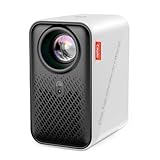
- ART PROJECTOR FOR DRAWING: Effortlessly project images, designs, and photos onto various surfaces, including walls, easels, blackboards, and whiteboards. Suitable for tracing, sketching, and artistic creation, this art projector caters to the needs of painting enthusiasts, professionals, designers, and artists alike. Take off the lens cover before using
- EXCLUSIVE DRAWING ASSISTANT: The built-in art software features tools like zooming, 360° rotation, and 3x3 grids. Our drawing app is designed to make your artistic process smoother and more intuitive. Select from 3 background colors and 4 unique artistic modes (Gridify, Sketchify, Comicize, and Monochromize) to adapt the drawing projector to your style and workflow
- EFFORTLESS IMAGE TRANSFER: Simply scan the QR code within the app or use a USB drive to easily transfer your images to the projector. This allows you to start your creative work immediately without worrying that a poor internet connection might disrupt your artistic process. You can also enjoy movie entertainment through multiple screen mirroring options, including EShare, AirPlay, and Miracast. Note: Copyrighted content from Hulu, Netflix, and similar services cannot be mirrored or cast via wireless transmission or HDMI cable
- AUTO FOCUS & KEYSTONE CORRECTION: Experience precise image scaling with our automatic screen-fit feature, which utilizes advanced algorithms, auto-focus, and keystone correction. The projection distance ranges from 3.1ft to 10.5 ft. This portable projector supports 4K video playback and boasts a lamp life of up to 10,000 hours for long-lasting performance
- ULTRA FAST DUAL BAND WIFI AND BLUETOOTH: The P1 projector provides 5G/2.4G dual band WiFi connection, which is faster, has larger data transmission capacity, and lower latency compared to 2.4G networks. It supports two-way Bluetooth 5.0 audio transmission, allowing connection to mobile devices as a standalone stereo speaker or pairing with external Bluetooth speakers, headphones, and soundbars to enhance audio effects for home projectors anytime and anywhere. Please note: Bluetooth function supports audio transmission only, not video
1. Artograph Inspire 1500: best overall purpose-built art projector
The Artograph Inspire 1500 is the best overall pick when your main activity is tracing, enlarging, positioning, or painting from digital artwork and you want an artist-oriented workflow rather than a home-theater interface.
Current artist-focused coverage identifies the Inspire 1500 as its overall choice and reports improvements over the earlier Inspire 1200, including keystone adjustment, screen mirroring, portability, and a remote control. See the specialist artist coverage for that comparison.
Best for
- Artists who project regularly onto canvas, paper, boards, or walls.
- Muralists who want dedicated art-projector controls.
- Users who prefer a purpose-built device over a generic smart projector.
Why choose it
A dedicated art projector makes sense when projection is part of your normal process. The useful advantage is not simply a resolution number; it is the combination of workflow-focused controls, manageable setup, and a design intended around enlarging artwork.
Why it may not fit you
The available evidence is specialist editorial coverage rather than independent laboratory testing performed for this guide. Confirm the current brightness rating, native resolution, US availability, warranty, included cables, and accessories before purchasing. Do not assume it is brighter, sharper, or more color-accurate than every general-purpose projector.
2. Artograph Flare 500: best portable dedicated art projector
The Artograph Flare 500 is a better fit when you move between rooms, studios, workshops, or temporary workspaces and still want an artist-specific projector. Artist-focused coverage positions it as an improvement over the earlier Flare 450 for tracing, canvas painting, and indoor murals.
Its natural territory is small-to-medium artwork in a controlled room. It is more purpose-built than a generic mini projector, but portability inevitably involves compromises in brightness, runtime, or both.
Best for
- Artists who carry equipment between locations.
- Small and medium canvases.
- Indoor workshops and temporary studio setups.
Why it may not fit you
Confirm whether the current package includes a battery and how the projector behaves while charging. Also verify a recognized brightness measurement rather than relying on a retailer’s headline number. “Portable” does not mean bright enough for a large mural with studio lights on.
Recommended Free Tools
3. Caydo M1C: best low-cost mini projector for small tracing jobs
The Caydo M1C is the budget-oriented choice for beginners and artists who mainly trace small canvases or drawing boards in a dim studio. Current specialist coverage describes it as a compact, wireless, rechargeable alternative to the Artograph Flare 500.
This is a narrowly defined recommendation: it is the best low-cost option here for small, dim-studio tracing, not the best projector for every artist or muralist.
Best for
- Beginners testing whether projection belongs in their workflow.
- Small canvases and drawing boards.
- Artists who value low cost and easy transport.
Limitations
- It is likely to struggle on large walls or in bright rooms.
- Focus uniformity and corner sharpness deserve a test before starting important work.
- Wireless connections may be less reliable than HDMI.
- Marketplace specifications, prices, and bundle contents can change.
Use high-contrast line art, reduce the projected image size, and darken the room as much as possible. If you need to see a large image while other lights remain on, move up to a substantially brighter presentation projector.
4. BenQ GV50: best portable general-purpose projector
The BenQ GV50 is the strongest choice for artists who want one portable projector for artwork, films, presentations, workshops, and general entertainment. It is not an artist-specific model, but its specifications make it a practical multipurpose option.
The Tool Desk
Outbyte PC Repair FREEClear out junk files and repair common Windows errorsFree Scan →Outbyte Driver Updater FREEFix the driver behind crashes, sound loss and screen glitchesFind Drivers →- Native 1080p resolution.
- 500 ANSI lumens.
- Laser light source.
- 30- to 120-inch stated image range.
- Built-in 2.1-channel, 18-watt speaker system.
- Tripod or floor-stand mounting through a universal 1/4-inch screw.
See BenQ’s official GV50 page for the manufacturer’s current specifications. Independent portable-projector coverage from RTINGS describes the GV50 as a versatile portable pick and notes that the XGIMI MoGo 4 Laser is a more colorful alternative, while the BenQ offers more physical setup features.
Also popular on Amazon

- VIVID ART PROJECTION: Say goodbye to dark rooms. With 400 ANSI lumens of brightness, this P3 art projector delivers crisp, vivid images even during the day. The built-in 360° swivel base eliminates extra stand costs, letting you cast designs instantly onto flat walls, tilted easels, chalkboards, or even ceilings. A standard 1/4"-20 thread on the base also fits any camera tripod, adding height and a stable setup when you need it
- EXCLUSIVE DRAWING ASSISTANT: Enhance your creative process with intuitive features including 0-200% zoom, 360° rotation, and 3x3 grids. Select from 3 background colors and 4 unique artistic modes-Gridify, Sketchify, Comicize, and Monochromize-to adapt the drawing projector to your style and workflow
- EFFORTLESS IMAGE TRANSFER: No more complicated operations. Simply scan the QR code within the app or use a USB drive to easily transfer your images to the projector. This allows you to start your creative work immediately without worrying that a poor internet connection might disrupt your artistic process. Flexible mirroring options also allow smooth video playback from smartphones, tablets, or laptops for entertainment. Note: Copyrighted content from Netflix, Hulu, and similar services cannot be mirrored
- AUTO FOCUS & KEYSTONE CORRECTION: Advanced algorithms enable rapid auto focus that adjusts clarity in under 3 seconds, ensuring a sharp and perfectly proportioned image at all times. Supporting projection from 3.6ft to 8.7ft, 4K video playback, and a 30,000-hour lamp life, this tracing projector combines precision with long-lasting performance
- DUAL-BAND WIFI 6 & BLUETOOTH 5.4: Benefit from high-speed 5G/2.4G WiFi with increased bandwidth and lower latency. Bluetooth 5.4 allows two-way audio use-connect the portable projector as an independent speaker or pair with external Bluetooth speakers, headphones, or soundbars for immersive sound. Note: Bluetooth supports audio only
Best for
- Artists who need a projector for more than painting.
- Portable indoor work and workshops.
- Users who want 1080p detail without carrying a full-size presentation projector.
Why it may not fit you
Five hundred ANSI lumens is modest for a large mural in a lit room. Automatic focus and keystone can make setup convenient, but they do not replace careful physical alignment when you need crisp, accurately placed lines.
5. Epson EX3290: best bright studio and mural option
The Epson EX3290 is the choice when visibility matters more than backpack portability. Epson lists WXGA resolution and 4,000 lumens of both color and white brightness, along with HDMI, USB, and a built-in picture-skew sensor. Its brightness makes it better suited to large indoor murals, classrooms, demonstrations, and studios where some lights must remain on.
Check Epson’s portable-projector page for current specifications and pricing. The page displayed a US price of $649.99 and a promotional price of $599.99 when retrieved on August 18, 2026; treat that as a dated price signal, not a current guarantee.
Why WXGA can still work for painting
WXGA is less detailed than 1080p, but line-art tracing does not automatically require full HD. A correctly aligned, sufficiently bright WXGA image can be more useful than a dim 4K projector, particularly when the source is a clean sketch and the artwork is large.
Why it may not fit you
The EX3290 is portable in the sense that it can be moved, not necessarily in the backpack-oriented sense. It also appears designed for nearby mains power rather than outdoor, battery-powered work. For a small canvas in a dark room, its size and brightness may be unnecessary.
How to choose a projector for your artwork
Start with the surface and the job
Different workflows demand different equipment:
- Canvas or paper tracing: prioritize focus, geometry, convenient input, and manageable size.
- Mural enlargement: prioritize brightness, throw distance, and stable mounting.
- Sign painting: prioritize crisp edges, accurate positioning, and low distortion.
- Classroom demonstrations: prioritize brightness, connectivity, and reliability.
- Projection art or installations: prioritize resolution, contrast, color behavior, placement flexibility, and video support.
- On-location work: prioritize battery operation, charging options, weight, and setup speed.
A projector optimized for tracing a small drawing is not automatically suitable for projection mapping or a mural several feet wide.
Brightness: the most important practical variable
As the image gets larger, the projector’s light is spread across more surface area. The image therefore becomes harder to see. Mural size and room darkness are among the most important practical factors identified by specialist art-projector guidance from Austin Gallery.
Quick wins for a faster PC:
Fix the driver behind crashes, sound loss and screen glitchesFind Drivers →Repair Windows errors before they cause bigger problemsFix Now →As a rough planning guide:
- Small canvas in a dim studio: approximately 100–500 measured lumens may be usable.
- Medium canvas or indoor wall: roughly 500–1,500 measured lumens is more forgiving.
- Large mural with lights on: favor a substantially brighter presentation projector; the exact requirement depends on size, distance, surface color, and texture.
These are practical ranges, not guarantees. A dark or textured wall absorbs and scatters light, while a bright room competes with the projected image. Never assume a cheap mini projector will remain visible in daylight.
ANSI, ISO, and vague “lumens” claims
ANSI lumens and ISO lumens are standardized brightness measurements, but they are different standards and should not be treated as identical numbers in one ranking. “LED lumens,” “light-source lumens,” and marketplace claims such as “10,000 lumens” may not be directly comparable.
For example, BenQ specifies the GV50 at 500 ANSI lumens, while XGIMI specifies the MoGo 4 at 450 ISO lumens. XGIMI also states that its specifications are measured in internal test environments and that actual performance varies with conditions and software versions. Compare ANSI with ANSI or ISO with ISO where possible, and label manufacturer figures as manufacturer claims.
Resolution: 720p, WXGA, 1080p, or 4K?
- 720p or WXGA: adequate for basic tracing and simple line art, especially on smaller work.
- 1080p: the practical sweet spot for detailed digital references.
- 4K: useful for very large work, fine photographic detail, video, and projection art.
Resolution cannot compensate for poor focus, keystone distortion, inadequate brightness, or unstable placement. For many painters, a sharp 1080p image positioned correctly is preferable to a dim 4K image.
Free tools Windows power users keep installed
One-click scans. No signup required.
Throw ratio and projection distance
Throw ratio = projector-to-surface distance ÷ image width. A lower throw ratio creates a larger image from a shorter distance.
Also popular on Amazon

- ART PROJECTOR FOR DRAWING: Effortlessly project images, designs, and photos onto various surfaces, including walls, easels, blackboards, and whiteboards. Suitable for tracing, sketching, and artistic creation, this art projector caters to the needs of painting enthusiasts, professionals, designers, and artists alike. Take off the lens cover before using
- EXCLUSIVE DRAWING ASSISTANT: The built-in art software features tools like zooming, 360° rotation, and 3x3 grids. Our drawing app is designed to make your artistic process smoother and more intuitive. Select from 3 background colors and 4 unique artistic modes (Gridify, Sketchify, Comicize, and Monochromize) to adapt the drawing projector to your style and workflow
- EFFORTLESS IMAGE TRANSFER: Simply scan the QR code within the app or use a USB drive to easily transfer your images to the projector. This allows you to start your creative work immediately without worrying that a poor internet connection might disrupt your artistic process. You can also enjoy movie entertainment through multiple screen mirroring options, including EShare, AirPlay, and Miracast. Note: Copyrighted content from Hulu, Netflix, and similar services cannot be mirrored or cast via wireless transmission or HDMI cable
- AUTO FOCUS & KEYSTONE CORRECTION: Experience precise image scaling with our automatic screen-fit feature, which utilizes advanced algorithms, auto-focus, and keystone correction. The projection distance ranges from 3.1ft to 10.5 ft. This portable projector supports 4K video playback and boasts a lamp life of up to 10,000 hours for long-lasting performance
- ULTRA FAST DUAL BAND WIFI AND BLUETOOTH: The P1 projector provides 5G/2.4G dual band WiFi connection, which is faster, has larger data transmission capacity, and lower latency compared to 2.4G networks. It supports two-way Bluetooth 5.0 audio transmission, allowing connection to mobile devices as a standalone stereo speaker or pairing with external Bluetooth speakers, headphones, and soundbars to enhance audio effects for home projectors anytime and anywhere. Please note: Bluetooth function supports audio transmission only, not video
This matters when your body would otherwise block the beam, when the studio is narrow, or when shadows fall across the mural. Long-throw projectors work well when the device can sit behind you. Short-throw models reduce the required distance. Ultra-short-throw models sit very close to the wall, but they are usually more expensive and can reveal wall imperfections more clearly.
Artist-focused guidance commonly uses an approximately 1.1:1–1.2:1 throw ratio as a flexible rule of thumb for mural work. Treat it as guidance, not a universal requirement. Calculate the distance for your actual wall before buying.
Keystone correction, lens shift, and physical alignment
Keystone correction digitally reshapes an image so a rectangle appears square when the projector is angled. It is useful for quick setup, but heavy use can reduce effective resolution and make fine lines less crisp.
Outdated Drivers Are Slowing You Down
One free scan finds every outdated or missing driver and matches the right update for your exact hardware.Free scan · exact hardware matchWindows Errors? Fix Them Before They Spread
Repair common Windows errors and clear accumulated junk for a smoother, more stable PC - no reinstall needed.Free scan · no reinstallFor precision tracing, use this order:
- Place the projector perpendicular to the work surface.
- Adjust its height and distance physically.
- Focus the lens.
- Use optical lens shift or zoom if available.
- Apply only minor digital keystone correction.
Test both the center and corners before tracing. Automatic correction is a convenience feature, not a substitute for alignment.
Battery and power
A built-in battery helps with outdoor murals, art fairs, workshops, temporary studios, and locations without a convenient outlet. The trade-off is commonly lower brightness, shorter runtime, or both.
Before buying a battery model, check whether the battery is replaceable, whether the projector can run while charging, whether USB-C power-bank input is supported, and whether the advertised runtime is measured in Eco Mode. For context, XGIMI specifies the MoGo 4 with a 71 Wh built-in battery and up to 2.5 hours of video playback in Eco Mode.
Inputs and wireless connections
Useful options include HDMI, USB playback, wireless screen mirroring, AirPlay, Miracast, and built-in Android or other smart operating systems. Compatibility is not universal: an iPad, iPhone, or USB-C laptop may require an adapter, and a projector may support Android casting but not AirPlay.
Use HDMI as your fallback for important work. It is generally more predictable than relying on a particular app, network, or mirroring protocol. Also check whether the projector’s streaming services are officially licensed if entertainment use matters to you.
Surface, color, noise, and heat
White, matte surfaces are easiest to project onto. Dark walls absorb light, glossy surfaces can create hotspots, and brick, stucco, and canvas texture can soften edges. An uneven wall can also make a geometrically correct image appear distorted.
For ordinary tracing, edge clarity and geometry matter more than cinematic color. For projection art, color gamut, contrast, and video handling become more important. Do not infer accurate paint-color reproduction from a wide-gamut claim alone.
Finally, consider fan noise, heat, and access to power. A quiet mini projector may be more pleasant beside a small canvas, while a bright presentation projector may produce more heat and require more ventilation.
Setup guide for tracing and mural painting
- Darken the room. Close blinds and turn off unnecessary lights, while keeping enough work light to handle paint safely.
- Secure the projector. Use a stable table, tripod, floor stand, or mount. Do not begin with the device balanced on books or an unstable box.
- Align it perpendicular to the surface. Square the lens to the wall or canvas before touching keystone.
- Choose the correct aspect ratio. Match the source artwork to the projector and surface so the image is not stretched.
- Disable unnecessary automatic correction. Auto-focus and auto-keystone can change when the device or lighting shifts.
- Focus the center and corners. Examine thin lines at the edges, not just a bold central shape.
- Set the image size and position. Reduce the size if the image is too dim or the corners are soft.
- Lock everything in place. Tape cable runs and mark stand positions so an accidental bump is recoverable.
- Mark reference points. Establish corners, key intersections, and proportions before tracing every detail.
- Keep the source device and cables accessible. A wired fallback saves time when wireless mirroring fails.
Troubleshooting common failures
The image is too dim
Reduce the image size, darken the room, leave Eco Mode, use a lighter surface, and increase the contrast of the projected line art. If the wall is large and lights must remain on, the solution is usually a brighter projector rather than a sharper one. Also check whether battery mode has reduced output.
Also popular on Amazon

- 【The Latest WIFI 6 Technology And Bluetooth 5.3】This projector with Wi-Fi and Bluetooth is equipped with the latest Wi-Fi 6 technology, compatible with Wi-Fi 6, 5G and 2.4G, offering faster connection speed and stronger stability, eliminating buffering and disconnection issues, and ensuring smoother online content playback. Additionally, it is fitted with the latest Bluetooth 5.3 chip, allowing for easy connection to Bluetooth speakers, headphones or other Bluetooth audio devices, providing a more efficient and stable transmission channel, and enabling users to enjoy higher audio quality with ease
- 【Built-in Streaming Media APP】Without any additional equipment,The YGSKK Wi-Fi projector supports streaming apps such as Prime Video, YouTube, and Hulu.The built-in applications allow you to easily enjoy a wide variety of movies, popular TV series and millions of other contents. Moreover, it also has an app store where you can download more applications. Whether it's a shared movie night or personal entertainment, this smart projector is very suitable
- 【Native 1080P High Definition,Compatible 4K】The native 1080P resolution presents you with clear and sharp full HD picture quality, with a brightness of up to 300 ANSI lumens, offering you images that are 50% brighter than those of similar projectors on the market. Whether you are watching movies, TV series, playing games or browsing photos, it will bring you astonishing clarity. Moreover, this movie projector is compatible with 4K, allowing you to enjoy the perfect experience of 4K picture quality. Note: Please ensure to connect 4K devices (such as TV sticks or USB drives) via HDMI to play 4K videos
- 【Wirelessly Connect to a Smart Phone, 50-200‘’ Large Screens】This is an amazing projector for iPhone. It is equipped with the "J-Share" setting, which enables wireless connection with smartphones. Both the phone and the projector need to be in the same network environment. Android phones need to download a program to connect, while iPhones do not need to download any applications (connect through the iPhone's screen mirroring function). In addition, this portable projector can project a large screen of 50 to 200 inches. You can adjust the screen size according to your personal preference to better enjoy the perfect experience of a large screen
- 【Strong Compatibility And Built-in Speakers】YGSKK projector for bedroom is equipped with three interfaces: HDMI, USB and audio (with an HDMI cable included). It is compatible with TV sticks, TV boxes, DVD players, laptops, USB flash drives, Switch/PS5, PC and other devices. The projector is built with high-fidelity stereo speakers, providing excellent and clear audio quality for an outstanding audio experience. It is also an excellent mini projector suitable for both indoor and outdoor activities
The edges are blurry
Reposition the projector so it is perpendicular, reset excessive keystone correction, refocus at the actual working distance, clean the lens, and reduce the image size. Check whether the surface itself is uneven. Test the corners before committing to a mural.
The rectangle is distorted
Correct the projector’s physical angle first. Adjust the stand, use lens shift or optical zoom if available, and apply only modest digital keystone. Mark the intended image corners before tracing.
You cast a shadow over the artwork
Move the projector farther back, mount it above or to the side, choose a short-throw model, or work from the opposite side of the beam. A closer projector is useful only if it still produces a visible, uniformly focused image.
Recommended Free Tools
Your phone will not mirror
Confirm that both devices are on the same network, check whether the projector supports AirPlay or Miracast, and look for app or DRM restrictions. If necessary, use a USB-C-to-HDMI or other appropriate adapter. Do not assume that “smart” means universal wireless compatibility.
The advertised brightness looks implausible
Be skeptical of generic listings using very large lumen numbers without identifying ANSI or ISO testing. Compare standardized measurements on the same basis and treat unverified marketplace figures as uncertain.
Alternatives worth considering
Opaque projectors
An opaque projector enlarges a physical drawing, photograph, or object placed inside it. It generally cannot receive a laptop or phone image like a digital LCD, LED, or laser projector. It can be ideal if your originals are physical, but it belongs in a separate category.
XGIMI MoGo 4
The XGIMI MoGo 4 is a battery-focused 1080p portable projector specified at 450 ISO lumens, with a 71 Wh battery and up to 2.5 hours of Eco Mode video playback. It is a credible alternative for artists who value lifestyle portability, but its ISO rating should not be compared directly with the GV50’s ANSI rating.
Quick wins for a faster PC:
Clear out junk files and repair common Windows errorsFree Scan →Scan for outdated or missing drivers - takes under a minuteDriver Scan →Repair Windows errors before they cause bigger problemsFix Now →XGIMI MoGo 4 Laser
The MoGo 4 Laser adds a triple-laser light source and is specified at 550 ISO lumens with 1080p resolution and a built-in battery. It may appeal to buyers who prioritize color and portability, but it is not a dedicated artist projector and does not solve the need for high brightness on a large mural.
XGIMI AURA
The XGIMI AURA is an ultra-short-throw 4K projector specified at 1,800 ISO lumens. It is useful when the projector must sit close to the wall; XGIMI recommends an 80- to 120-inch projection range. It is less suitable for portable work and can make wall imperfections or alignment errors more obvious.
Used or refurbished presentation projectors
A used or refurbished Epson or BenQ unit can be a sensible budget route for muralists who need brightness more than compactness. Check lamp hours, replacement-lamp cost, dead pixels, input compatibility, fan noise, and the seller’s return policy before committing.
A tablet and grid method
For small work or locations where power and setup are impractical, a tablet plus a proportional grid can replace a projector. It is slower to enlarge, but it avoids brightness, alignment, wireless, and shadow problems.
The Tool Desk
Outbyte Driver Updater FREEFix the driver behind crashes, sound loss and screen glitchesFind Drivers →Outbyte PC Repair FREERepair Windows errors before they cause bigger problemsFix Now →Our verdict
Choose the Artograph Inspire 1500 if projection is a regular part of your art practice and you want a dedicated workflow. Choose the Artograph Flare 500 for portable dedicated-art use, or the Caydo M1C for inexpensive small-canvas tracing in a dark room. The BenQ GV50 is the better all-round portable device, while the Epson EX3290 is the practical choice when a large mural must remain visible under ambient light.
The decisive questions are simple: How large will the image be, how dark can the room become, and can the projector sit squarely at the required distance? Answer those before comparing “4K,” battery claims, or impressive-looking lumen numbers.
Quick Recap


