Recommended Free Tools
Crashes, No Sound, or Screen Glitches?
Windows Errors? Fix Them Before They Spread
Repair common Windows errors and clear accumulated junk for a smoother, more stable PC - no reinstall needed.Free scan · no reinstallOutdated Drivers Are Slowing You Down
One free scan finds every outdated or missing driver and matches the right update for your exact hardware.Free scan · exact hardware matchFree scan · under a minute
Windows Errors? Fix Them Before They Spread
Free scan · no reinstall
Outdated Drivers Are Slowing You Down
Free scan · exact hardware match
ThatPainter is reader-supported. When you buy through links on our site, we may earn an affiliate commission. Learn More
ugee’s UT2 and UT3 are standalone Android drawing tablets: each has its own display, battery, processor, storage, Android 14 operating system, and rechargeable U-Pencil. Unlike a conventional pen display, neither needs a Windows or macOS computer for ordinary drawing.
As an Amazon Associate I earn from qualifying purchases.
The UT2 is the lighter, smaller, lower-cost choice for travel sketching, study, notes, and casual illustration. The UT3 costs more and weighs considerably more, but offers a much larger canvas, additional memory and storage, a larger battery, four speakers, and three display modes. Both look promising on paper, but ugee’s published specifications do not independently establish app compatibility, color accuracy, actual battery life, or professional-workflow performance.
What are the ugee UT2 and UT3?
A standalone drawing tablet runs its operating system and creative apps internally. That makes it different from:
Popular on Amazon

- Large Active Drawing Space: UGEE M708 V3 graphic drawing tablet features 10 x 6 inch large active drawing space with papery texture surface, provides enormous and smooth drawing for your digital artwork creation, offers no-lag sketch and painting experience
- 16384 Passive Stylus Technology: A more affordable passive stylus technology offers 16384 levels of pressure sensitivity allows you to draw accurate lines of any weight and opacity according to the pressure you apply to the pen, sharper line with light pressure and thick line with hard pressure for artistry design or unique brush effect for photo retouching
- Compatible with Multiple System and Softwares: Powerful compatibility, tablet for drawing computer, perform well with Windows 11/10/8/7, Mac OS X 10.10 or later, Android 10.0 or later, mac OS 10.12 or later, Chrome OS 88 or later and Linux; Driver program works with creative software such as Photoshop, Illustrator, Macromedia Flash, Comic Studio, SAI, Infinite Stratos, 3D MAX, Autodesk MAYA, Pixologic ZBrush and more
- Ergonomically Designed Shortcuts: 8 customizable express keys on the side for short cuts like eraser, zoom in and out, scrolling and undo, provide a lot more for convenience and helps to improve the productivity and efficiency when creating with the drawing tablet
- Easy Connectivity for Beginners: The UGEE M708 V3 offers USB to USB-C connectivity, plus adapters for USB C, ensuring easy connection to various devices and allowing beginner artists to set up quickly and focus on their creativity without compatibility concerns; Whether using a laptop, desktop, chromebook, or tablet, the UGEE M708 V3 provides a seamless experience for those just starting their digital art journey
- A pen display: a screened tablet that generally depends on a connected computer.
- A screenless graphics tablet: a computer accessory with no built-in display.
- A general-purpose tablet with a stylus: an iPad or Android tablet that also supports drawing.
The UT2 and UT3 occupy the first category. Both run Android 14 and combine a built-in display, processor, memory, storage, battery, wireless connectivity, and active pen in one device. ugee introduced the products in its announcement published March 24, 2026, saying they were unveiled at IFA 2025.
ugee UT2: the portable option
The UT2 has a 10.36-inch, 2000 × 1200 display in a 16:10 format. At 466g and 7.53mm thick, it is substantially easier to carry and hold than the UT3. Its 7000mAh battery, included smart folio, and included U-Pencil make it a practical self-contained sketching kit.
Recommended Free Tools
It is best suited to artists who sketch while travelling, students who want one device for notes and drawing, beginners building a digital-art setup, and anyone who values a compact tablet more than maximum canvas area.
The compromise is working space. A 10.36-inch screen leaves less room for detailed painting, reference images, animation timelines, or split-screen workflows. The official product page also does not provide a brightness figure, refresh-rate figure, or independent color-accuracy measurement. The advertised “up to 130 hours” applies to the stylus’s claimed operating time—not to tablet battery life.
See the official UT2 specifications and buying page for the current model details.
ugee UT3: the large-canvas option
The UT3 expands the display to 14.25 inches with a 2400 × 1600 resolution and a 3:2 aspect ratio. That shape provides more vertical room than the UT2 for a canvas, reference material, documents, and split-screen use. It also has 8GB of RAM, 256GB of internal storage, and a 10,000mAh battery.
What’s actually slowing this PC down?
Pick the symptom - the matching free tool is one click away.
Also popular on Amazon
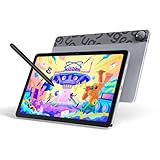
- Android 14 Draw Anywhere, No computer Needed:This standalone Android drawing tablet runs the latest Android 14, supporting new 2024+ apps like Krita 6.0 and Clip Studio Paint EX/Clip Studio Paint EX—With built-in WiFi, you can seamlessly download brushes/updates upload finished artworks to the cloud while traveling. The Bluetooth 5.0 lets you wirelessly connect headphones for immersive drawing sessions,without being tied to a desk
- 18W Fast Charge,9H Marathon Sessions:UT2 graphic tablets a assive 7000mAh battery delivers 9+ hours of continuous drawing (8% hourly drain rate) ,The 18W fast charging refuels 50% in just 60 mins, minimizing downtime. Ideal for pen display digital artists who need uninterrupted creativity
- UT2 Drawing Pad,Ultra Thin and Light:This 10.36-inch standalone drawing tablet (≈ A5 paper size) combines ultra-thin 6.95mm/466g portability with true plug-and-play freedom,it’s slimmer than most smartphones (thinner than an iPhone 15),slipping effortlessly into backpacks while delivering full studio precision.Whether you're outdoor sketching or working remotely, just power on and start drawing instantly
- 10-inch 2K Artist Tablet with Eye Protection:The ugee pad with an 100% sRGB color gamut colors appear vibrant and true-to-life and 2K Resolution (2000×1200, 277PPI) for Studio-Quality Detail(sharper than standard FHD) reveals fine brushstrokes, intricate linework, and subtle gradients,The UT2 features a nano-etched matte glass screen, reducing glare, minimizes strain during marathon creative sessions, whether you’re designing logos, animating, or taking notes in a dimly lit studio
- Art Tablet Powerful Core:This drawing tablet Mediatek Helio G99 SoC with an 8-core processor and 6GB RAM ensure smooth multitasking between art apps and photo references, while 128GB storage (expandable to 1TB) holds thousands of sketches perfect for offline artists and features dual 8MP cameras to instantly capture references snap a flower or building and import directly to canvas with one tap
The larger screen should appeal to illustrators and painters who dislike cramped canvases, as well as users who want to read, write, attend video meetings, watch media, or multitask on the same device. Four speakers and a 13MP front camera make it the more capable general-purpose tablet on paper.
Portability is relative, however. The UT3 weighs 760g—294g more than the UT2. It may be comfortable on a desk or folio stand, but it is less appealing for long handheld sketching sessions. Its display is listed at 60Hz, so it should not be treated as a high-refresh professional monitor.
The UT3 also has a dedicated physical U-Key. A press switches between Regular, Ink Paper, and Color Paper modes. “Ink Paper” is a display treatment, not true electronic ink: the UT3 remains an LCD/IPS-style Android tablet according to its listed display specifications.
Read the official UT3 product page for its current specifications and accessories.
UT2 vs UT3: specification comparison
The following figures are manufacturer-provided specifications, not independent test results.
| Feature | ugee UT2 | ugee UT3 |
|---|---|---|
| Display | 10.36 inches, 2000 × 1200 | 14.25 inches, 2400 × 1600 |
| Aspect ratio | 16:10 | 3:2 |
| Operating system | Android 14 | Android 14 |
| Processor | MediaTek MT8781 / Helio G99 family | MediaTek MT8781 / Helio G99 |
| Memory | 6GB RAM | 8GB RAM |
| Storage | 128GB | 256GB |
| Battery | 7000mAh | 10,000mAh |
| Weight | 466g | 760g |
| Thickness | 7.53mm | 6.95mm |
| Cameras | 8MP front and rear | 13MP fixed-focus front; 8MP autofocus rear |
| Speakers | Two | Four |
| Bluetooth | 5.3 | 5.0 |
| Expansion | Up to 1TB TF/microSD listed | Maximum expansion capacity not clearly specified |
| Display modes | Standard drawing display | Regular, Ink Paper, and Color Paper |
Drawing experience: what the specifications do—and do not—tell you
Both tablets include ugee’s U-Pencil. The listed specifications include 4096 pressure levels, ±60° tilt support, and a claimed 20ms response time. The UT2 page also lists an initial activation force of no more than 10g. ugee lists a 13g stylus weight, approximately one hour of charging time, up to 130 hours of operating time, and up to 60 days of standby time.
Also popular on Amazon

- 143% sRGB Color Gamut:143% sRGB ultra-high color gamut, the UE16 drawing tablets with screen showcases an exceptional ability to reproduce 16.7 million colors with its 8-bit color depth. This precision and finesse ensure an accurate and vivid portrayal
- Four Color Spaces:With the options of sRGB, Adobe RGB, DCI-P3, and Black & White mode, the UE16 drawing tablet allows you to seamlessly transition between different visual experiences whether you're drawing, designing, or simply reading
- 16K Pressure Sensitivity:Art tablet offers a remarkable pressure level, ensuring that your creations are rich and vibrant.Whether you are drawing or writing, each stroke is effortlessly translated onto the screen, resulting in flawless and precise lines
- Pencil-like Grip:The graphic tablet designed with a slim body for comfortable grip, U-Pencil features two customized hotkeys and a pressure-sensitive eraser. With the quick access to drawing tools, your creative process will be more smooth and seamless
- Shortcut Keys & Wheel:Featuring 8 physical shortcut keys, digital drawing tablet provides a tactile feedback that enhances the drawing experience.the scroll wheel allows for seamless transition between 4 preset functions by pressing the switch button
Those numbers are useful, but they cannot predict the complete drawing experience. Pressure-level counts do not prove smoother pressure transitions, and a stated response time is not the same as total visual or software latency. The supplied product material does not independently test line wobble, diagonal accuracy, cursor offset, hover behavior, palm rejection, pressure consistency, or performance in particular art apps.
There is also an inconsistency in ugee’s material. The promotional announcement says “±5mm Accuracy,” while the product specifications state ±0.5mm accuracy at the center and ±1mm at the edge. The product-page figures are the more specific specifications, but buyers should not regard either set as an independent accuracy test.
Windows Errors? Fix Them Before They Spread
Repair common Windows errors and clear accumulated junk for a smoother, more stable PC - no reinstall needed.Free scan · no reinstallCrashes, No Sound, or Screen Glitches?
Random freezes, missing sound and display glitches usually trace back to one bad driver. Find and replace yours safely.Free scan · under a minuteWhat does “paper-like” mean?
Both models use ugee’s NanoMatte paper-like glass or finish. The company describes it as anti-glare, anti-fingerprint, and designed to add friction between the pen and screen. The UT3 additionally advertises TÜV Rheinland eye-comfort certification and low-blue-light and anti-glare features.
A matte, textured surface can reduce reflections and give the pen more resistance, which some artists prefer for controlled strokes. It can also reduce perceived sharpness or color “pop” compared with glossy glass and may increase nib wear. “Paper-like” is a tactile marketing description, not a standardized display-performance category. Eye-comfort certification does not mean the screen eliminates eye strain.
Android software and drawing apps
ugee advertises a Ready-to-Draw Suite and identifies PaintPal as part of the drawing experience. The UT2 product material also mentions MediBang Paint and PaintPal.
That does not mean every Android art application will work identically with the U-Pencil. Before buying, verify the exact app you use and check whether it supports:
Also popular on Amazon

- 【Widely Application】This art tablet is perfect for beginners for drawing,animation,photo-editing or design work in most programs including Adobe Photoshop, paint tool sai,illustrator, corel draw, corel painter, sketchbook, manga studio, clip studio paint
- meet all your needs for every subject with online tutoring softwars: Power Point, Wrod, OneNote, PDF et
- 【System Requirements】Digital tablet not only compatible with Mac 0S 10.10,Windows 7 or later,Chrome OS 88 or later and Linux, UGEE S640 pc drawing pad also supports Android 6.0 or later
- 【Portable Drawing Tablet】Draw tablet is slim and light design allows you to take it anywhere like classroom, business trip,etc. UGEE S640 drawing board is a convenient tool for e-learning and remote teaching
- It will help you engage in an interactive virtual classroom anywhere, anytime. UGEE S640 only needs 2 hours for charging, enough for 10 hours of full-time drawing
- Pressure and tilt input from the U-Pencil.
- Palm rejection and any pen-specific settings.
- Cloud storage or straightforward export to a computer.
- Your required file formats, layer counts, brushes, and shortcuts.
- Google Play access and app availability in your region.
Apps such as Clip Studio Paint, ibisPaint, Krita, MediBang Paint, Infinite Painter, and Concepts may offer Android versions, but the available product pages do not establish that every app is preinstalled, fully compatible, or equivalent to its desktop version. Subscription requirements and advanced features also vary by application.
Both tablets support general Android activities such as browsing, reading, streaming, online learning, and entertainment. The UT3 page lists OTG support for a keyboard and mouse, but Android 14 does not turn either model into a laptop with unrestricted desktop software. ugee also does not state how many Android upgrades or security updates the tablets will receive.
Battery, portability, and accessories
The tablet batteries are rated at 7000mAh for the UT2 and 10,000mAh for the UT3. These are capacities, not promises of a particular number of drawing hours; brightness, app load, wireless use, and screen settings affect runtime. Keep the tablet figure separate from ugee’s “up to 130 hours” stylus claim.
The UT2 includes a smart folio and stylus. The UT3 product listing includes a smart folio, stylus, charger, cable, glove, nib extractor, and nibs. A replacement U-Pencil 311A for the UT3 was listed at $29 and replacement nibs at $15 when checked, but accessory compatibility should be confirmed for the specific model.
The Tool Desk
Outbyte Driver Updater FREEFix the driver behind crashes, sound loss and screen glitchesFind Drivers →Outbyte PC Repair FREEClear out junk files and repair common Windows errorsFree Scan →Which one should you buy?
| Your priority | Better fit | Why |
|---|---|---|
| Travel and handheld sketching | UT2 | Smaller footprint and 466g weight |
| Large illustrations or painting | UT3 | 14.25-inch, 3:2 canvas |
| Beginner or student setup | Usually UT2 | Lower cost and easier portability, unless canvas size is decisive |
| Reading, meetings, and media | UT3 | More RAM and storage, four speakers, and larger display |
| Reference images and split-screen work | UT3 | More physical screen area |
| Desktop-only creative software | Neither automatically | Consider a computer-dependent pen display instead |
Choose the UT2 if portability, value, and casual-to-intermediate drawing matter most. Choose the UT3 if you will draw mainly at a desk and want a larger canvas, more storage, a larger battery, and the three display modes enough to justify the extra weight and price.
When a different tablet category makes more sense
A conventional pen display may be the better purchase if you already own a capable computer, rely on desktop-only software, work with large layered files, or do professional animation, 3D, or compositing. It can also provide a larger screen for the same budget, although it gives up standalone portability.
Also popular on Amazon

- STANDALONE DRAWING TABLET WITH ANDROID 14:This standalone drawing tablet requires no computer connection—simply unbox and start creating right away. Powered by a 6nm octa-core processor and the latest Android 14 OS, this graphic tablet delivers smooth, responsive performance for digital art, note-taking, and entertainment. Whether you're an art enthusiast, student, or professional, this art tablet is built to handle your most demanding creative projects.
- STUNNING 14.25-INCH ULTRA-LARGE DISPLAY:Experience your artwork on a massive 14.25-inch drawing pad with ultra-thin 6.95mm profile and lightweight 760g design. The expansive drawing tablet with screen gives you plenty of room to bring your ideas to life, while the portable form factor makes it the perfect digital drawing tablet for artists on the go. Enjoy the best of both worlds—an ultra-large canvas in an incredibly lightweight package.
- U-KEY COLOR MODE SWITCHING FOR VERSATILE USE:Effortlessly toggle between Regular, Ink Paper, and Color Paper modes with the intuitive U-Key function. Whether you're fully engaged in reading an eBook, jotting down notes with a paper-like feel, or enjoying vibrant visuals, this drawing pad for computer (and without!) adapts to your activity. It's the ultimate digital art pad for those who need flexibility across work, study, and play.
- ADVANCED EYE CARE WITH U-PAPER TECHNOLOGY:Create for hours without eye fatigue. This graphic drawing tablet features U-paper technology and TÜV Rheinland-certified low blue light filter, significantly reducing harmful blue light exposure. The advanced eye-care system ensures comfortable viewing during prolonged use, making this sketch tablet an ideal choice for artists, students, and professionals who spend long hours in front of a screen.
- MASSIVE 10000MAH BATTERY WITH 27W FAST CHARGING:Never let your creativity run dry. Equipped with a massive 10000mAh battery and 27W DC fast charging, this Android tablet keeps you creating all day long without hunting for an outlet. The long-lasting battery life ensures your drawing tablet standalone is always ready when inspiration strikes—whether you're in the studio, classroom, or on the move.
A general iPad or Android tablet may be preferable if app breadth, long-term platform support, cameras, speakers, accessories, and a mature tablet ecosystem matter more than a drawing-specific matte surface. A screenless graphics tablet remains the simplest choice when you are happy working at a computer and do not need a built-in display.
Price and availability
On August 18, 2026, ugee’s official UT2 page showed an observed sale price of $279, formerly $299. The UT3 product page showed $399, reduced from $499, while ugee’s standalone drawing-pad collection showed $429 reduced from $499. Because the official pages did not agree, verify the checkout price before purchasing. Taxes, shipping, regional availability, and promotions can change the final amount.
Do these 3 things before closing this tab:
1Scan for outdated or missing drivers - takes under a minute2Repair Windows errors before they cause bigger problems3Fix the driver behind crashes, sound loss and screen glitchesSee ugee’s standalone drawing-pad collection for current listings.
What remains unverified
The official specifications establish the products’ intended features, but they do not independently prove zero lag, paper-identical feel, professional-grade color, outdoor readability, or compatibility with every Android drawing app. The available material also does not establish actual tablet endurance, display brightness, gamut accuracy under measurement, long-term Android support, remaining free storage, or replacement-pen availability in every region.
Those uncertainties matter most to professional artists. The UT2 and UT3 are credible options for self-contained sketching and illustration, but buyers whose work depends on color-critical output, desktop software, or demanding production files should verify those requirements before treating either tablet as a primary studio system.
Quick Recap


