Free tools Windows power users keep installed
One-click scans. No signup required.
Crashes, No Sound, or Screen Glitches?
Random freezes, missing sound and display glitches usually trace back to one bad driver. Find and replace yours safely.Free scan · under a minutePC Slower Than It Used to Be?
A free scan shows the junk files, broken settings and background clutter dragging Windows down - then fixes them in one click.Free scan · Windows 10 & 11ThatPainter is reader-supported. When you buy through links on our site, we may earn an affiliate commission. Learn More
The Wacom One 14 (DTC141) is a 14-inch Full HD pen display for drawing on a connected computer—not a standalone tablet. Its battery-free pen and 309 × 174 mm active drawing area make it a compact option for beginners, students, and painters who want to work directly on screen. The important caveat is the connection: the simplest one-cable setup requires USB-C with video, power, and data support. Wacom’s US store listed it at $299.95 when checked; price and availability can change.
As an Amazon Associate I earn from qualifying purchases.
Wacom One 14 specs at a glance
| Specification | Wacom One 14 |
|---|---|
| Model | DTC141; US store SKU DTC141W0 |
| Display | 14-inch IPS, 1920 × 1080 pixels, 16:9, 16.7 million colors |
| Active area | 309 × 174 mm (12.2 × 6.9 inches) |
| Panel finish | Direct-bonded glass with anti-glare and anti-fingerprint treatment |
| Published color, brightness, and contrast | 98% sRGB typical; 285 cd/m² typical; 1000:1 typical (manufacturer specifications) |
| Pen | Wacom One Standard Pen; battery-free electromagnetic resonance; 4096 pressure levels; tilt support to 60°; 2540 lpi; two side switches |
| Size and weight | 336 × 201 × 10 mm; 750 g |
| Operating system and driver | Windows 10 or later, macOS 13 or later, or latest ChromeOS; current Wacom driver |
| Single-cable host connection | USB-C with DisplayPort Alternate Mode, 7.5 W Power Delivery, and data |
| Observed US store price | $299.95 when checked; confirm current price and stock |
Screen diagonal is only part of the workspace story. The 309 × 174 mm active area describes where the pen can draw, while 1920 × 1080 is Full HD resolution. When comparing pen displays, look at both figures, not just the diagonal.
The Tool Desk
Outbyte PC Repair FREERepair Windows errors before they cause bigger problemsFix Now →Outbyte Driver Updater FREEScan for outdated or missing drivers - takes under a minuteDriver Scan →What the screen and pen specifications mean for painting
A compact 14-inch canvas
The 16:9 panel offers a Full HD computer display with a defined active drawing area of 309 × 174 mm. That is a relatively compact working surface, so consider how much room you want for the artwork, tool panels, and reference images in your painting software. Wacom describes the direct-bonded construction as reducing parallax, and its product materials describe the glass surface as paper-like; these are manufacturer descriptions, not independent measurements.
#1 Best Overall
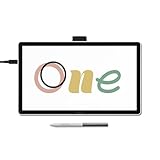
- BIGGER CANVAS, BETTER DETAIL: Redesigned with more drawing area, the laminated 14" crisp IPS Full HD display offers generous space with 98% sRGB color accuracy and a paper-like texture that won’t glare or smudge – keeping you in your creative zone longer
- PRECISE, NATURAL FEEL: Draw with the control that made Wacom a favorite; the battery-free pen never needs charging and captures everything from light lines to bold strokes with Wacom’s responsive pressure sensitivity
- COMPLETE CREATIVE STARTER KIT: Includes trials of Clip Studio Paint Pro, Magma, Concepts & Foxit software, and Skillshare training courses - your jumpstart to creating beautiful art right away
- RELIABLE PERFORMANCE: Wacom's proven reliability works seamlessly with your computer – no driver headaches, mysterious disconnects, or frustrating "why isn't this working?" moments common with cheaper alternatives
- COMPATIBILITY: PC (Windows 10 or later), Mac (OS 13 or later), Chromebook; Easy plug-in via single USB-C: devices requiring HDMI require additional converter, cable and power adapter kit (sold separately)
Battery-free pen, published capabilities
The included Wacom One Standard Pen does not need charging. Wacom specifies 4096 pressure levels, tilt support up to 60 degrees, two side switches, and 2540 lpi resolution. Those specifications establish supported features, but they do not by themselves show how natural the pen feels, how low its latency is, or how well pressure and tilt behave in a particular painting app.
Color and brightness are manufacturer figures
Wacom lists 98% typical sRGB coverage, 285 cd/m² typical brightness, and 1000:1 typical contrast. These are published specifications rather than independent test results. If accurate color is essential to a painting or photo-editing workflow, treat those figures as a starting point rather than proof of calibrated color performance.
Rank #2
- W129280722
Compatibility: check the computer before buying
The Wacom One 14 must be connected to a computer. Wacom Support states: “No, Wacom One is not a stand-alone device, so connecting to PC is required.” Wacom also says to install the latest driver.
For a one-cable connection
The host USB-C port must support all three of the following:
Rank #3

- DRAW WITH NATURAL ROTATION CONTROL: 360° barrel rotation allows supported brushes and tools to respond to how you rotate the pen, enabling expressive line variation similar to pencils, flat brushes, and calligraphy tools
- PRECISE AND RESPONSIVE FEEL: 8,192 pressure levels and tilt support provide smooth control for sketching, shading, and detailed illustration
- COMFORTABLE GRIP WITH SMART STORAGE: Thick, easy-to-hold body with a narrow pen tip improves visibility and control, while three spare nibs are stored inside the pen barrel
- BATTERY-FREE PREMIUM WACOM EMR TECHNOLOGY: No charging, no batteries, and no cables required for uninterrupted creative sessions
- COMPATIBILITY: Currently works with Wacom MovinkPad Pro 14, Wacom Cintiq (DTK168, DTK246, DTH246) and Wacom Intuos Pro (PTK470, PTK670, and PTK870). Support for additional Pro Pen 3-enabled Wacom devices will be added over time.
- DisplayPort Alternate Mode for video
- Power Delivery of 7.5 W
- Data transfer
A USB-C connector alone does not confirm those capabilities. Check the computer manufacturer’s specifications for the exact port you plan to use.
If the computer lacks DisplayPort Alt Mode
Wacom’s launch information says a Wacom Converter is needed for PCs without DP Alt Mode and that it is sold separately. The appropriate converter, cable, and power arrangement can depend on the host, so verify the configuration with Wacom before purchasing an adapter. Wacom lists the Converter among its accessories: Wacom One 14 included items and accessories.
Rank #4

- Studio Level Pen Display: Experience fluid, accurate, and responsive pen strokes with the Pen Display 16 Bundle's meticulously tuned pressure curve, ranging from 3g to 500g, catering to various drawing styles and hand pressures. Enjoy stunning 4K OLED display quality with 1.07 billion colors and 5 color gamut coverage, ensuring precise color accuracy and enhanced color reproduction from deep blacks to vibrant highlights. With its Super AG Etching surface, the Pen Display 16 Bundle provides smooth pen control and a pen-and-paper-like drawing experience.
- Thin, Lightweight, Portable: Because it was designed with portability in mind, the Pen Display 16 bundle features a 16-inch screen with a thickness of only .47 inches (12mm) and weight of only 2.67lbs (1.21kgs). It also has single USB-C cable connectivity, allowing for easy use and flexible positioning. There is an included protective carrying case that can hold the Pen Display 16 bundle and all included accessories, allowing users to create anywhere with ease.
- Bundled with Quick Keys: The Xencelabs Quick Keys has an OLED screen and 8 buttons with 5 sets for up to 40 customizable shortcuts per application. The dial has four modes for zoom, rotation, brush size, and more. It supports any application that uses shortcut keyboard keys.
- Two Battery-free Pens: The Pen Display 16 bundle includes two pen sizes, the 3 Button Pen v2 and Thin Pen v2, with built-in erasers and customizable settings per application, offering adaptability to individual preferences and hand sizes.
- Virtual Tablet Mode and Intuitive Driver: The Pen Display 16 bundle supports the exclusive Virtual Tablet Mode for selecting and controlling objects on another display. The driver is intuitive and updated regularly, and the settings panel makes it easy to customize Quick Keys, pen pressure sensitivity, pen buttons, and more.
Supported systems
Wacom lists Windows 10 or later, macOS 13 or later, and the latest ChromeOS, alongside a current Wacom driver. Confirm that your computer meets the operating-system and port requirements before relying on the display for a class or studio setup. See Wacom’s product support information.
What’s actually slowing this PC down?
Pick the symptom - the matching free tool is one click away.
What comes in the box, and what is optional
Wacom’s support listing says the box includes:
- Wacom One 14 display
- Wacom One Standard Pen
- Three pen nibs and a nib removal tool
- USB-C cable
- Quick Start Guide and Important Product Information
The foldable stand, Converter, pen cases, and replacement tips are listed as accessories rather than universal requirements. Wacom’s October 2025 accessory matrix marks ACK24911Z Standard Nibs 10-pack and ACK24919Z Felt Nibs 10-pack as compatible with DTC141. Check current availability and compatibility before ordering.
Best Value
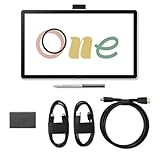
- Connect your Wacom One 14 to a computer using the Wacom Converter and your HDMI and USB cables along with an AC power cable & adapter (power plug sold separately)
- Redesigned with more drawing area, the laminated 14" crisp IPS HD display offers generous space with 98% sRGB color accuracy and a paper-like texture that won’t glare or smudge – keeping you in your creative zone longer
- Draw with the control that made Wacom a favorite; the battery-free pen never needs charging and captures everything from light lines to bold strokes with Wacom’s responsive pressure sensitivity
- Wacom's proven reliability works seamlessly with your computer – no driver headaches, mysterious disconnects, or frustrating "why isn't this working?" moments common with cheaper alternatives
- PC (Windows 10 or later), Mac (OS 11 or later), Chromebook; Easy plug-in via single USB-C: devices requiring HDMI require additional converter, cable and power adapter kit
Price and who it suits
Wacom’s US store listed the DTC141W0 at $299.95 and marked it in stock when checked. This is a US storefront observation, not a guaranteed price for another region or a later date; confirm the current listing and stock before buying.
The value depends on the whole setup, not just the display price. If your computer cannot provide the required USB-C video, power, and data connection, factor in whether a separate Converter is suitable and what the compatible setup costs. Also weigh the 14-inch active area, Full HD resolution, pen features, published color and brightness specifications, and 750 g weight against the workspace and portability you need.
- It may fit beginners, students, and painters who want a compact screen to draw on and already have a compatible computer.
- It is a poor fit if you need a standalone tablet that works without a computer.
- Consider carefully if you need a larger drawing area, higher-than-Full-HD resolution, or independently verified display performance.
Review evidence and performance claims
Wacom’s September 17, 2025 introduction describes the intended uses and product features. Notebookcheck published a specification-focused news overview on September 17, 2025, updated February 25, 2026. Those sources do not establish a hands-on test of drawing feel, latency, color accuracy, or long-term reliability. Accordingly, the specifications above should not be read as independent performance results.
Recommended Free Tools
Optional software offers
Wacom says registering the display with a Wacom ID provides access to complimentary software trials, including Clip Studio Paint Pro and Magma Blaze, plus a Skillshare trial. These are promotional offers that may vary by region or change; check the current redemption terms with Wacom.
Quick Recap

Product prices and availability are accurate as of the date/time indicated and are subject to change. Any price and availability information displayed on Amazon at the time of purchase will apply.




