Free tools Windows power users keep installed
One-click scans. No signup required.
The Tool Desk
Outbyte PC Repair FREEClear out junk files and repair common Windows errorsFree Scan →Outbyte Driver Updater FREEFix the driver behind crashes, sound loss and screen glitchesFind Drivers →ThatPainter is reader-supported. When you buy through links on our site, we may earn an affiliate commission. Learn More
3D art is visual work built from three-dimensional geometry and presented as a still image, animation, game asset, virtual environment, or interactive scene. Artists create the scene’s models, materials, lighting, and cameras; a renderer calculates how that scene appears in an image or sequence of frames.
What makes art “3D”?
A 3D scene represents objects in space rather than only drawing their outlines on a flat canvas. Its geometry may be built from vertices, edges, faces, and surfaces. Artists shape that geometry and give it color, texture, and material qualities, then arrange lights and cameras to create the intended view.
Autodesk defines 3D modeling as “a computer graphics process of creating a mathematical representation of a 3D object or shape using specialised software.” Autodesk’s 3D modeling overview describes modeling as a way to create digital objects for visualization and other uses.
#1 Best Overall

- [A GIFT FOR THE WHOLE FAMILY] Create, Draw, Doodle, and Build in 3D with this affordable yet high grade 3D pen. The new SCRIB3D P1 3D Pen helps improve spatial thinking, creativity and artistic skills. Great for quality family time and as a practical tool for making handmade gifts or decorations, or for everyday fixes around the home. The P1 Pen features a stepless speed function designed for optimal speed control no matter the task - whether slower intricate projects or faster infill work.
- [READY-TO-USE KIT] Includes 3 colors (30 feet) of PLA plastic to keep you Doodling for ages, as well as a power adapter, step-by-step manual, and a free stencil guide. Just plug in, heat it up and enjoy the fun of creating three-dimensional masterpieces. PLA is a versatile, easy-to-use printing plastic that is great for both first time and advanced users.
- [BEGINNER FRIENDLY] Plug the adapter into the back of the pen and choose your filament. The red light will turn on indicating warm up, this will take about 2-3 mins. Double click the forward button to start and feed the filament through the back of the pen. Once the filament has reached the nozzle of the pen, click forward to stop. Press and hold the forward button or double click for a continous flow. Once you have completed your design, press and hold the reverse button to retract filament.
- [MULTI-FUNCTIONAL] The SCRIB3D P1 Pen is temperature adjustable to accommodate multiple types of filament: PLA (160-210℃, 320-410°F) or ABS (210-235℃, 410-455°F). Unlike other 3D printing pens, the P1 has an easy-to-use stepless speed slider, designed for optimal speed adjustment. Perfect for any task, from slow & intricate projects to faster infill work.
- [SAFE & RISK FREE PURCHASE] The P1's ceramic nozzle and premium motor ensure safety and high performance without clogging. Equipped with 2 minute auto sleep function after 3D doodling stops, anti clogging features, and intititve controls ensure a seamless Doodling experience. 1 year guarantee and responsive customer service. Buy with 100% confidence. If there are any quality issues or you need getting started tips, please feel free to contact us and we'll be happy to help.
The finished work does not have to be a realistic picture. 3D art can be stylized, abstract, or designed for interaction. A rendered image may look like a painting or photograph, while a game asset or virtual environment can be explored from changing viewpoints.
Modeling and rendering are different jobs
Modeling creates the objects and structure of a scene. Rendering calculates how that scene looks from a camera, taking its models, materials, lights, and other scene elements into account. Blender Education explains that a rendering engine renders a scene containing models, lights, and cameras into an image.
Rank #2

- High-Quality Ingredients: Crafted from premium materials, our modeling paste ensures durability and smooth application for your artistic projects.
- Versatile Usage: Perfect for sculpting, modeling, and adding texture to a variety of surfaces including canvas, wood, and more.
- Easy to Use: With a creamy consistency and excellent workability, our modeling paste allows for intricate detailing and effortless manipulation.
- Quick Drying Formula: Designed to dry quickly without cracking, allowing you to build layers and add intricate details to your artwork with ease.
- Professional Results: Achieve professional-quality results with this modeling paste, whether you're a beginner or experienced artist, enhancing your creations with depth and dimension.
In practical terms, a model is not automatically a finished picture: it needs a view and a way to display its surfaces. Likewise, rendering does not create the underlying model; it turns the scene that an artist has assembled into visible output.
How 3D art is made
A project may use only some of these stages. A single still image, for example, may not need a character rig or animation. A film shot or game character may pass through the full pipeline.
Rank #3

- PRINTING EXPERIENCE ENHANCED: This product contains all the essential tools a maker needs to successfully 3D print, as well as additional items to further simplify your experience for a faster and better workflow. With all the tools in this kit, successfully making and handling 3D prints has never been easier and faster
- 45 Pieces SET: product includes 1 set of deburring tools(1 pc NB1100 deburring tool handle & 6 pcs deburring blades), Electronic Digital Caliper, 10 pcs Cleaning Needles, Art knife set(14 pcs blades and 1 pc handle), Long nose pliers, Flush cutters, 3 pcs wire brush, Nozzle cleaning kit, Tube Cutter, 2 print removal spatula, needle file, Cutting Mat, Glue stick and storage bag
- FOR REFINED POST-PROCESSING: YEETIN 3D Printing Tool Kits entail multiple tools specifically chosen and proven to refine your 3D printing, use the nozzle cleaning kit to remove small blockages in the nozzle, calipers and needle files for precise measurement, as well as a deburring tool and art knife blades for fine post-processing
- EXCELLENT PACKAGE:All of these essential tools are packed in a travel-size tool pouch that allows you to easily store and carry them, and also prevents them from getting lost
- GIFT IDEA FOR 3D PRINT MAKER: We have chosen quality tools for this kit based on the experience of 3d printing enthusiasts and our staff, even novice or professional 3d printmaker will love this product
- Model or sculpt the forms. Artists can begin with simple primitives and edit their geometry, or shape organic forms with digital sculpting tools. Autodesk identifies wireframe, surface, solid, and 3D sculpting (polygonal) modeling as basic types. Hard-surface approaches are often suited to manufactured forms such as vehicles, buildings, and props; sculpting is useful for organic characters, creatures, and detailed forms.
- Set materials and textures. Materials establish properties such as color and roughness, while textures add surface detail. These choices help an object read as wood, metal, skin, glass, or another material.
- Place lights and cameras. Lighting affects the appearance and mood of forms; the camera sets the viewpoint and composition. Both shape what the eventual image communicates.
- Add a rig and animation if the work needs movement. A rig gives a model a controllable framework for posing or movement. Autodesk describes rigging as giving 3D models “a skeletal framework” for realistic movement.
- Render the scene. The renderer produces a still image or animation frames, calculating visible effects such as shading and reflections. Motion blur may also be part of an animated render.
- Composite and edit the result when needed. Artists can combine rendered elements, apply visual effects and color work, and edit frames into a finished sequence.
These stages are not always a one-way checklist. Artists often adjust a model, material, light, or camera after seeing a render, then render again. Blender’s official manual describes the suite as covering modeling, rendering, animation and rigging, video editing, visual effects, compositing, texturing, and simulations.
Modeling approaches and rendering choices
Wireframe, surface, and solid models
A wireframe shows an object’s underlying edges and vertices, making its topology visible. A surface model represents the exterior skin of a form. A solid model represents volume as well as the outside, which is useful when interior volume matters. These approaches answer different needs; one is not universally best.
Rank #4
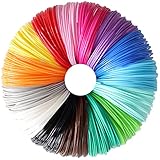
- High Quality 1.75mm PLA Filament: 100% New Pure Material Produced, Precise Diameter Controlled, Safe to Printing, Non-Toxic and No Bubbles, Environmentally Friendly, Smooth Printing for Kids and Adults
- Bright Most Popular 15 Colors Mixed: Black, Brown, Grey, White, Yellow, Orange, Pink, Red, Rose Red, Purple, Dark Blue, Sky Blue, Cyan, Lime Green, Dark Green, Great Sample Pack for 3D Pen / 3D Printer
- Widely Compatibility: Universal Support For Various 3D Pens/3D Printers on market, Fit For MYNT3D / SCRIB3D Printing Pen, While Not Fit for 3.0mm 3Doodler Pen
- Package: Each Color Length is 10feet, 15 Bright Solid Colors Mixed, Total 150 Feet PLA Filament Sample Packed by One Vacuum Bag, It's Great Sample and Test Pack for 3D Pen/ 3D Printer Newcomer and Expert
- After-Sales Service: Within 24 Hours Response, If Any Question, Pls Kindly Inform Us at Any Time, We'll Always do our Best to Support You all the Time, Create 3D Art and Start Your 3D Printing Now!
Hard-surface modeling or sculpting
For objects with manufactured shapes—such as appliances, vehicles, architecture, and props—artists often use hard-surface modeling techniques to control edges and constructed forms. Sculpting offers a more direct way to develop organic forms and fine surface detail. Many projects combine approaches rather than choosing only one.
Real-time or offline rendering
Real-time rendering is designed to update interactively, making it useful in games and scene previews. Offline rendering is used when a project can spend longer calculating an image in pursuit of its intended look. There is no universal speed or quality threshold separating them: the result depends on the renderer, scene, hardware, settings, and production needs.
Best Value
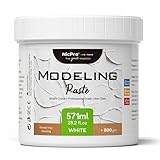
- Premium-Grade Composition: Nicpro modeling paste with a 571ml capacity is meticulously crafted from top - notch materials. This ensures not only its durability but also enables a smooth application process for all your artistic undertakings.
- Multifaceted Utility: Our modeling paste for texture art is a versatile choice. It's ideal for sculpting, modeling, and imparting texture to a wide range of surfaces, including canvas, wood, and many others. It serves as a go - to material for diverse creative projects.
- User-Friendly Application: Boasting a creamy consistency and excellent workability, our modeling paste makes intricate detailing a breeze. You can manipulate it effortlessly, whether you're creating fine details or larger - scale forms.
- Swift-Drying Formul: Engineered with a quick - drying formula, our modeling paste dries rapidly without cracking. This allows you to build multiple layers and add elaborate details to your artwork with ease, streamlining your creative process.
- Professional-Caliber Outcomes: Regardless of whether you're a novice or a seasoned artist, our modeling paste helps you achieve professional - quality results. It adds depth and dimension to your creations, elevating the overall aesthetic of your artworks.
Where 3D art is used
3D work can communicate a design, depict an imagined world, or support an interactive experience. Autodesk lists architecture, construction, product development, science, medicine, film, television, and video games among fields that use 3D models to visualize, simulate, and render designs. Its 3D design overview also names manufacturing, architecture, media, and entertainment.
- Games and interactive media: models, characters, props, and environments can be used in scenes that respond to a player or viewer.
- Film and television: 3D art can create characters, sets, effects, and animated sequences.
- Architecture and construction: models help show how proposed spaces and structures may look.
- Product design and manufacturing: digital objects can communicate and visualize designs.
- Science and medicine: 3D representations can help depict subjects and designs for visualization or simulation.
The same underlying skills can serve very different goals: an artist making a stylized game prop and a designer visualizing a product both build and present three-dimensional forms, but their constraints and intended outputs differ.
Which software should a beginner use?
For someone who wants to explore the full 3D pipeline without an upfront software cost, Blender is a practical starting point. Its official manual describes it as a free, open-source 3D creation suite and documents support for Linux, macOS, and Windows. It covers modeling, animation, rendering, compositing, video editing, and other parts of production.
There is no single best 3D program for everyone. Choose based on the kind of work you want to make, your operating system and budget, and whether you need compatibility with a particular studio or project workflow. Commercial suites may make sense for specialized tools, production support, established studio standards, or existing project files; those benefits depend on the specific software and context.
- Modeling or sculpting: look for tools that suit the forms you want to build.
- Animation or visual effects: check for the rigging, simulation, compositing, and editing features your work requires.
- Architecture or product design: consider the formats and design workflows used by your collaborators.
- Games: check how the software fits with your intended game-development workflow and assets.
Autodesk’s modeling documentation can help clarify professional concepts even if you use another program. For a learning resource focused on games, Blender Education lists Game Development with Blender by Dalai Felinto and Mike Pan. Software features and learning materials can change, so check the official documentation for current details.
Quick Recap

Product prices and availability are accurate as of the date/time indicated and are subject to change. Any price and availability information displayed on Amazon at the time of purchase will apply.




