The Tool Desk
What’s actually slowing this PC down?
Pick the symptom - the matching free tool is one click away.
Outbyte PC Repair FREEClear out junk files and repair common Windows errorsFree Scan →Outbyte Driver Updater FREEScan for outdated or missing drivers - takes under a minuteDriver Scan →
ThatPainter is reader-supported. When you buy through links on our site, we may earn an affiliate commission. Learn More
Windows 11 has a color picker in Snipping Tool, but Microsoft says it is available only on Windows 11 AI+ PCs and Copilot+ PCs. If you do not see it, PowerToys offers a separate color picker for Windows that you can enable in its settings.
Use Snipping Tool for a quick screen-color selection on an eligible PC. For a configurable picker with a zoomed view, editor, and color history, install PowerToys and use its default Win+Shift+C shortcut.
What Windows 11’s color picker does
There are two different options: Color picker in Snipping Tool, and the separately installed PowerToys Color Picker. Both let you select a color from the screen and copy it to the clipboard.
Microsoft describes PowerToys Color Picker as a utility that copies screen colors in configurable formats. HEX is its default copied format. Its zoomed view helps you inspect the area beneath the pointer before selecting a color.
#1 Best Overall

- SPECIFICATIONS: Monitor calibration colorimeter with Easy 1 2 3 software workflow, USB C connection, compact body approx. 34mm tall x 37mm diameter, adjustable counterweight for screen placement, supports up to 2 displays, brightness target selection including Native or Photo with before and after check.
- EASY SETUP: Guided 1 2 3 workflow makes calibration fast and approachable, helping photographers and creators achieve more accurate color without complicated settings, so you can edit with confidence and trust what you see on screen.
- COLOR ACCURACY: Corrects common monitor color shifts to deliver truer tones and more reliable contrast, improving consistency across editing sessions and helping your images look closer to final output on other screens and devices.
- DUAL DISPLAY SUPPORT: Calibrates up to 2 monitors for matching color across a multi screen workspace, ideal for photo editing, video work, and creative setups where consistent viewing on both displays matters.
- BEFORE AFTER CHECK: Built in comparison view lets you instantly see the difference after calibration, making it easy to confirm improved accuracy and maintain consistent results by repeating the process on a regular schedule.
How to use Snipping Tool Color picker
- Open Snipping Tool from Start.
- Select Color picker.
- Select a color on your screen.
- Copy the selected value to the clipboard.
Microsoft Support documents these steps and says the feature is available only on a Windows 11 AI+ PC and a Copilot+ PC. The Windows+Shift+S shortcut opens the Snipping Tool overlay for screenshots; the documented color-picker steps are performed in Snipping Tool.
Why the Color picker may be missing
Microsoft Support lists Snipping Tool’s Color picker as available only on Windows 11 AI+ PCs and Copilot+ PCs. If your PC does not meet that documented eligibility, the option may not be available.
Rank #2

- SPECIFICATIONS; Includes Calibrite Display Plus HL colorimeter measuring up to 10,000 nits plus ColorChecker Passport Video 2 for capture reference, designed for monitor calibration, white balance setup, exposure control, camera matching, and consistent color workflow.
- CAPTURE ACCURACY; Passport Video 2 helps set correct white point, verify exposure, and match cameras on set, delivering reliable reference for consistent footage and stills in changing or mixed lighting conditions.
- HIGH LUMINANCE CALIBRATION; Display Plus HL profiles mini-LED, OLED, and Apple XDR panels with extreme brightness capability, ensuring accurate color representation for professional photo editing and video grading workflows.
- EDITING CONFIDENCE; Built for creators who demand trustworthy color management, this kit reduces trial-and-error corrections, improves workflow efficiency, and supports accurate results from capture through final delivery.
- PRO CREATOR WORKFLOW; Ideal for videographers and photographers who require consistent color standards across multiple cameras, monitors, and software platforms, helping maintain professional results from on-set capture through final post-production.
The reviewed Microsoft documentation does not establish a complete hardware compatibility list, minimum Windows build, regional availability, or rollout schedule. Do not assume that installing a particular update will make the feature appear on every Windows 11 PC.
Use PowerToys if Snipping Tool Color picker is unavailable
Microsoft PowerToys Color Picker is a separate utility for Windows. Install PowerToys using an official Microsoft-provided route, then enable Color Picker in PowerToys Settings.
Rank #3

- SPECIFICATIONS; Includes Calibrite Display 123 colorimeter for monitor calibration plus ColorChecker Passport Video 2 for video and photo capture control, designed for exposure reference, white balance setup, and consistent color workflow from capture through edit.
- CAPTURE CONTROL; Passport Video 2 helps set accurate white point, verify exposure, and match multiple cameras on set, giving filmmakers and hybrid shooters a reliable reference for consistent footage in changing or mixed lighting conditions.
- MONITOR CALIBRATION; Display 123 provides an easy monitor profiling workflow so photographers and creators can trust on-screen color when editing, grading, designing, or delivering work that must remain consistent across displays.
- CREATIVE CONFIDENCE; Built for content creators who want dependable color management, this kit reduces trial-and-error corrections, improves workflow efficiency, and supports accurate results for both still photography and professional video production.
- PRO CREATOR WORKFLOW; Ideal for videographers and photographers who require consistent color standards across multiple cameras, monitors, and software platforms, helping maintain professional results from on-set capture through final post-production.
- Open PowerToys Settings.
- Select Color Picker and enable it.
- Check its activation shortcut and change it if needed.
- Press the default Win+Shift+C shortcut to activate the picker.
- Choose a color from the screen; PowerToys copies it in the selected format.
PowerToys settings let you configure output formats and activation behavior, including mouse actions. The editor can fine-tune HSV, RGB, and HEX values and store up to 20 picked colors, according to Microsoft Learn.
Snipping Tool or PowerToys?
| Feature | Snipping Tool Color picker | PowerToys Color Picker |
|---|---|---|
| Availability | Microsoft documents it for Windows 11 AI+ PCs and Copilot+ PCs | Separate PowerToys install |
| Setup | Open Snipping Tool and select Color picker | Install PowerToys and enable Color Picker in settings |
| Activation | Select Color picker in Snipping Tool | Win+Shift+C by default; configurable |
| Formats | Copies the selected color to the clipboard | Configurable formats; HEX by default |
| Zoom and editing | Not established in the reviewed documentation | Zoomed view and color editor |
| Color history | Not established in the reviewed documentation | Editor history of up to 20 picked colors |
Choose Snipping Tool if your PC is eligible and you need a straightforward screen-color selection. Choose PowerToys if you want a configurable utility with a dedicated shortcut, zoom, editor, and history.
Rank #4
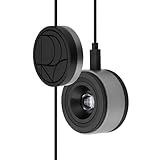
- 3-in-1 multiple function with Colorimeter, Display OSD control and ASUS Dial features
- Integrated colorimeter, both with Hardware and Software Calibration via ASUS exclusive software tool to keep long-term color accuracy and consistency
- Measuring up to 10000 nits for precise HDR calibration, seamlessly compatible with LED, OLED, Mini-LED, and more
- 5-way navigator and shortcut key provide intuitive Display OSD control accessible within the reach of your hand
- Integrate ASUS Dial provide customize shortcuts for easy, precise control of your creator software
FAQ
Does Windows 11 have a built-in color picker?
Yes. Snipping Tool has a Color picker, but Microsoft says it is available only on Windows 11 AI+ PCs and Copilot+ PCs.
Why is the color picker missing on my Windows 11 PC?
The Snipping Tool feature may be missing because Microsoft documents it as limited to Windows 11 AI+ PCs and Copilot+ PCs. The reviewed support documentation does not give a full compatibility list or other eligibility details.
Best Value

- QUICK & EASY COLOR CALIBRATOR: Whether you're editing photos, designing graphics, or producing content, SpyderExpress helps you view colors with precision and confidence; Ideal for creators who want accurate, lifelike colour in both digital and print
- READY FOR THE LATEST DISPLAYS: The only calibrator of its kind to currently support the latest Liquid Retina XDR displays, including the MacBook M4 mini-LED screen, alongside everyday monitors; Upgrade the software for OLED and advanced mini-LED support
- 3x FASTER THAN TYPICAL ENTRY-LEVEL TOOLS: Get edit-ready color in just 90 seconds - see skin tones, shadows, and highlights as they’re meant to be, with consistent, trustworthy results
- GROW YOUR TOOLKIT WITH SOFTWARE UPGRADES: Unlock advanced features like ambient light adjustment, multi-display profiling, and DevicePreview - shows how your work will appear across different devices; No new hardware needed, upgrade when you're ready
- REAL COLOUR, REAL EASY: Download the software, plug in the device, and follow the 3 simple steps. Save profiles, calibrate up to 3-connected displays per workstation, and recalibrate before editing to ensure your screen always shows true-to-life color
What is the PowerToys Color Picker shortcut?
The default activation shortcut is Win+Shift+C. You can check or change it in PowerToys Settings.
Can PowerToys copy colors in different formats?
Yes. PowerToys supports configurable output formats and copies in HEX by default. Its editor also lets you fine-tune HSV, RGB, and HEX values.
Quick Recap

Product prices and availability are accurate as of the date/time indicated and are subject to change. Any price and availability information displayed on Amazon at the time of purchase will apply.
Recommended Free Tools




