Windows Errors? Fix Them Before They Spread
The Tool Desk
Outbyte PC Repair FREEClear out junk files and repair common Windows errorsFree Scan →Outbyte Driver Updater FREEScan for outdated or missing drivers - takes under a minuteDriver Scan →Outbyte PC Repair · freeRepair common Windows errors and clear accumulated junk for a smoother, more stable PC - no reinstall needed.
Fix My PC Now →ThatPainter is reader-supported. When you buy through links on our site, we may earn an affiliate commission. Learn More
MadMapper is the strongest starting point if mapping onto physical surfaces is your main job. For live VJ sets, choose Resolume Arena; for a more approachable, no-code workflow, consider HeavyM. TouchDesigner and Isadora suit interactive work, while Millumin is built for Mac-based shows. If you need a genuinely free starting point, distinguish TouchDesigner’s non-commercial edition from open-source MapMap and free Windows tool VPT: their terms and capabilities are not interchangeable.
This is a use-case shortlist, not a universal ranking. The best choice depends on the surfaces you are mapping, how you will play and control content, your computer, and whether the work is commercial.
As an Amazon Associate I earn from qualifying purchases.
PC Slower Than It Used to Be?
A free scan shows the junk files, broken settings and background clutter dragging Windows down - then fixes them in one click.Free scan · Windows 10 & 11Outdated Drivers Are Slowing You Down
One free scan finds every outdated or missing driver and matches the right update for your exact hardware.Free scan · exact hardware matchQuick comparison
| Software | Best for | Platform | Free access | Price signal | Main trade-off |
|---|---|---|---|---|---|
| MadMapper | Dedicated video and LED mapping | macOS, Windows | Demo with restrictions | Rental from €39/month, excluding tax, on the vendor page captured in August 2026 | Not as focused on live clip-deck performance as Resolume |
| Resolume Arena | Live VJ performance with mapping | macOS, Windows | Watermarked trial | €799 for Arena on the vendor shop captured in August 2026 | Costs more than entry-level options; Arena is distinct from Avenue |
| HeavyM | Beginner-friendly mapping and effects | macOS, Windows | Demo | Current price not stated on the retrieved vendor information | Output and integrations depend on edition |
| TouchDesigner | Generative and interactive installations | Check current platform support for the build you intend to use | Free for non-commercial use, subject to license terms | Commercial edition $600; Pro $2,200 on the vendor pricing information captured in August 2026 | Steep learning curve; free edition is not for paid work |
| Millumin | Mac-based theater and cue-driven shows | macOS only | 30-day trial; watermark after trial | Rental from €29 for seven days; lifetime from €399, before applicable tax, on the vendor page captured in August 2026 | No Windows or Linux version |
| Isadora | Interactive audiovisual performance | macOS, Windows | Demo Mode | Current price not stated in the retrieved product information; check the vendor store | Not a mapping-first architectural calibration tool |
| MapMap | Free, basic 2D mapping | Check current supported builds | Free and open source | Free, subject to current project terms and availability | Fewer advanced integrations and less commercial support |
| VPT | Basic free mapping on Windows | Windows | Free, subject to current availability | Free | More utilitarian; verify compatibility for your computer |
Price figures are vendor-displayed signals captured in August 2026, not guaranteed checkout prices. Currency, tax, region, license duration, and edition affect what you pay. Follow each linked vendor page for current terms.
What projection-mapping software does
Projection mapping is not just playing a video full-screen. The software lets you fit imagery to a surface that may be angled, irregular, or made up of separate shapes. Depending on the application, it can warp corners or meshes, mask areas, composite layers, route content to multiple displays, and trigger playback or external controls.
#1 Best Overall

- AI-Powered 3D Mapping, No Expertise Needed: SpaceFlow transforms your Nebula X1 Pro or X1 into a full AI mapping system—precision camera hardware and spatial recognition algorithms automatically build an accurate 3D model of your wall in minutes, fitting every animation perfectly to any surface shape or angle, without professional modeling
- 100+ Ready-to-Use Templates for Every Holiday and Occasion: Browse an ever-growing official library of professionally designed templates in the Nebula Connect app — covering holidays, celebrations, and everyday ambience, each paired with matching themed audio
- Free Mode or AI Fusion Mode — You Choose: Masking Templates are free and project within an auto-scanned boundary. AI Fusion Templates use Sparks to let AI analyze your wall's shape and texture—generating content that naturally blends into every surface detail
- Set Up in Minutes, Not Weeks: Traditional 3D mapping requires 16+ days of specialist work. SpaceFlow completes the entire process in under 10 minutes—no specialist software, extra equipment, or technical expertise required
- Designed for Nebula X1 Pro & X1: SpaceFlow is an AI mapping accessory exclusively compatible with Nebula X1 Pro and Nebula X1 projectors—not a standalone projector. More compatible models coming soon
Tools in this list occupy different roles: MadMapper is mapping-focused; Resolume Arena combines mapping with live VJ mixing; TouchDesigner is a real-time visual-programming environment; Millumin centers on timelines and show cues; Isadora combines media playback with visual programming. HeavyM, MapMap, and VPT offer more direct entry points to mapping, with different levels of polish and production capability.
Also separate content creation from playback. Blender, After Effects, Cinema 4D, or Unreal Engine can help create visuals, but they do not automatically replace a live mapping application for warping, routing, cueing, and projector alignment.
How to choose the right tool
- Mapping: Check whether you need corner pinning, mesh warping, polygon masks, multiple surfaces, LED mapping, or edge blending. Do not assume every edition includes every feature.
- Playback: Decide whether you need a timeline and cue stack, a live clip deck, playlists, layers, effects, looping, or real-time generative graphics.
- Control and interaction: For a show, check the specific edition’s support for MIDI, OSC, DMX, Art-Net, timecode, cameras, sensors, and other inputs you plan to use.
- Outputs and hardware: Match the software canvas and output routing to your projectors, GPU, display connections, and any capture or video-over-network workflow.
- License: Identify whether access is a demo, a paid trial, a non-commercial edition, a rental, or a commercial license. A free download is not necessarily a free production license.
- Show conditions: Consider whether the system must run unattended, recover from a disconnected projector, or have a tested fallback. Software alone cannot guarantee reliable synchronized output across projectors.
1. MadMapper: best dedicated mapping tool
Why choose it
MadMapper is the clearest fit when the central task is mapping images and video onto physical surfaces—such as a wall, sculpture, stage set, or building facade. Its dedicated warping and masking workflow makes it a more direct choice than a general-purpose visual-programming environment when you mainly need to align content accurately.
What to know before buying
The vendor lists macOS and Windows support and offers a demo, but the demo is not a clean production license: restrictions include watermarked output and periodic DMX blackout behavior. Its specifications page displayed rental from €39 per month, excluding tax, in August 2026; one-time purchase pricing was not clearly stated in the retrieved information. Check the current license terms and checkout page before committing, especially if you need to run a show on multiple computers.
MadMapper is less suited than Resolume Arena to improvisational clip-deck VJ sets, and less suited than TouchDesigner or Isadora to custom, sensor-driven logic. See the MadMapper specifications and demo details.
Rank #2
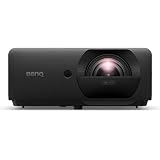
- VIVID CLARITY - Experience stunning Full HD (1920 x 1080) resolution with 4000 ANSI lumens brightness, ensuring brilliant and detailed projections even in well-lit environments.
- DYNAMIC CONTRAST - Achieve exceptional image depth with a 3,000,000:1 contrast ratio, delivering rich blacks and bright whites for a truly immersive visual experience.
- EXTENDED LIFESPAN - Benefit from a long-lasting laser light source, offering up to 30,000 hours in ECO mode, significantly reducing maintenance and replacement costs.
- VERSATILE CONNECTIVITY - Seamlessly integrate with various devices using dual HDMI 2.0b inputs, USB Type-A ports, and LAN connectivity for flexible media playback and control.
- PRECISE PROJECTION - Utilize advanced keystone adjustment (2D, Auto Vertical +/- 30 degrees, Horizontal +/- 30 degrees) for perfectly aligned images from diverse angles.
2. Resolume Arena: best for live VJ performance
Why choose it
Choose Arena when the operator needs to trigger clips, mix layers, apply effects, and improvise during a concert, club night, festival, or live event. Projection mapping is part of a broader performance workflow rather than the sole focus.
The Tool Desk
Outbyte PC Repair FREERepair Windows errors before they cause bigger problemsFix Now →Outbyte Driver Updater FREEFix the driver behind crashes, sound loss and screen glitchesFind Drivers →Arena is not Avenue
Resolume Avenue is the VJ-oriented edition; Arena adds advanced projection-mapping and show-control capabilities. If those advanced mapping functions are essential, do not treat Avenue as interchangeable with Arena. The shop displayed €299 for Avenue and €799 for Arena in August 2026. Licenses work on macOS and Windows; purchases include 12 months of free updates, and the last eligible update remains usable after that period. The trial adds a Resolume watermark and a robot voice to audio output, so it is not an unrestricted free production edition. Check the Resolume shop for current licensing and trial terms.
For precise architectural alignment as the main task, compare it with MadMapper. Arena is also not a substitute for a custom generative or 3D content pipeline.
3. HeavyM: best for beginners
Why choose it
HeavyM is a good candidate if you want a more approachable, no-code route to mapping, built-in effects, playlists, transitions, and music-reactive visuals. It can reduce setup friction for a first projection-mapping project or a straightforward event without requiring you to build a node network.
Check edition limits
HeavyM offers Live, Pro, and Pro+ editions, and the available outputs, resolution, edge blending, NDI, DeckLink, OSC, DMX, export, and automation features vary by edition. The vendor describes Live as limited to one output and 1920×1200; verify the current edition comparison against your planned projector setup. Its published minimum requirements include an Intel Core i5-class processor, 4 GB RAM, and a GPU with 2 GB VRAM; listed recommended GPU examples include NVIDIA GTX 1060, AMD RX580, or Apple M1. Those are vendor specifications, not a guarantee that every complex show will perform well.
Rank #3

- 【The Latest WIFI 6 Technology And Bluetooth 5.3】This projector with Wi-Fi and Bluetooth is equipped with the latest Wi-Fi 6 technology, compatible with Wi-Fi 6, 5G and 2.4G, offering faster connection speed and stronger stability, eliminating buffering and disconnection issues, and ensuring smoother online content playback. Additionally, it is fitted with the latest Bluetooth 5.3 chip, allowing for easy connection to Bluetooth speakers, headphones or other Bluetooth audio devices, providing a more efficient and stable transmission channel, and enabling users to enjoy higher audio quality with ease
- 【Built-in Streaming Media APP】Without any additional equipment,The YGSKK Wi-Fi projector supports streaming apps such as Prime Video, YouTube, and Hulu.The built-in applications allow you to easily enjoy a wide variety of movies, popular TV series and millions of other contents. Moreover, it also has an app store where you can download more applications. Whether it's a shared movie night or personal entertainment, this smart projector is very suitable
- 【Native 1080P High Definition,Compatible 4K】The native 1080P resolution presents you with clear and sharp full HD picture quality, with a brightness of up to 300 ANSI lumens, offering you images that are 50% brighter than those of similar projectors on the market. Whether you are watching movies, TV series, playing games or browsing photos, it will bring you astonishing clarity. Moreover, this movie projector is compatible with 4K, allowing you to enjoy the perfect experience of 4K picture quality. Note: Please ensure to connect 4K devices (such as TV sticks or USB drives) via HDMI to play 4K videos
- 【Wirelessly Connect to a Smart Phone, 50-200‘’ Large Screens】This is an amazing projector for iPhone. It is equipped with the "J-Share" setting, which enables wireless connection with smartphones. Both the phone and the projector need to be in the same network environment. Android phones need to download a program to connect, while iPhones do not need to download any applications (connect through the iPhone's screen mirroring function). In addition, this portable projector can project a large screen of 50 to 200 inches. You can adjust the screen size according to your personal preference to better enjoy the perfect experience of a large screen
- 【Strong Compatibility And Built-in Speakers】YGSKK projector for bedroom is equipped with three interfaces: HDMI, USB and audio (with an HDMI cable included). It is compatible with TV sticks, TV boxes, DVD players, laptops, USB flash drives, Switch/PS5, PC and other devices. The projector is built with high-fidelity stereo speakers, providing excellent and clear audio quality for an outstanding audio experience. It is also an excellent mini projector suitable for both indoor and outdoor activities
The vendor page lists Windows 8/10/11 64-bit and macOS 10.15 or later; because that includes older operating systems, confirm current compatibility for your machine. The demo is for evaluation, not an assumed unrestricted free production version. Current prices were not stated in the retrieved product information. See HeavyM’s edition and system information.
4. TouchDesigner: best for generative and interactive work
Why choose it
TouchDesigner is for technical artists who want visuals to respond to cameras, sensors, tracking, data, or custom logic. Its node-based environment supports procedural graphics and flexible real-time systems that can go well beyond manual surface alignment. That flexibility comes with a substantially steeper learning curve than a mapping-focused tool.
Understand the license before using it
TouchDesigner Non-Commercial is free for personal, educational, or evaluation use, but not for paid work. The vendor lists a 1280×1280 output limit for the free edition and notes that some commercial/pro operators are omitted. The pricing information captured in August 2026 listed Educational at $300, Commercial at $600, and Pro at $2,200. Commercial is intended for paid projects; Pro adds capabilities including advanced synchronization, frame-lock, tracking integrations, and direct support. Check eligibility and license terms rather than assuming that a free edition can be used for a client, sponsor, or compensated installation.
Build and platform support can change. The documentation identified Official Build 2025.33070, dated July 16, 2026, and recommends official rather than experimental builds where live-show or installation stability matters. Confirm current downloads and operating-system compatibility before planning a system. Start with the TouchDesigner download page, product editions, and license details.
Crashes, No Sound, or Screen Glitches?
Random freezes, missing sound and display glitches usually trace back to one bad driver. Find and replace yours safely.Free scan · under a minuteWindows Errors? Fix Them Before They Spread
Repair common Windows errors and clear accumulated junk for a smoother, more stable PC - no reinstall needed.Free scan · no reinstall5. Millumin: best for Mac-based theater and timed shows
Why choose it
Millumin is designed for cue-driven audiovisual productions such as theater, dance, museum presentations, and multimedia performance. Its V5 feature set includes timelines, multiple canvases, output warping, masks, perspective transforms, DMX, LED pixel mapping, MIDI, OSC, timecode, Arduino, and other integrations. The vendor lists multiple displays up to 16K, subject to the computer’s hardware.
Rank #4

- HIGH-BRIGHTNESS FHD LASER PROJECTOR: This projector delivers Full HD 1920 x 1080 resolution and 5,500 ANSI lumens with a 1.13-1.47 throw ratio for bright, detailed images in boardrooms, classrooms, lecture halls, and golf simulators.
- GOLF MODE FOR REALISTIC SIMULATION: Designed for immersive play, this laser projector supports major golf simulators while its laser phosphor light source provides up to 30,000 hours of operation in Dynamic Eco mode.
- LARGE-SCREEN PROJECTION: Display images from 30 to 300 inches with this video projector, using a 1.3x optical zoom to adapt the image for meeting rooms, classrooms, training spaces, and public venues.
- FLEXIBLE INSTALLATION: H/V keystone, 4-corner adjustment, portrait mode, and 360-degree projection make this ceiling projector easier to position for permanent installations and rooms with challenging projector placement.
- VERSATILE CONNECTIVITY: Dual HDMI 1.4 inputs, USB Type A, RS232 control, audio out, and a built-in 15W speaker make this business projector ready for compatible presentation systems, media devices, and installed environments.
Platform and license model
Millumin V5 requires macOS Big Sur 11 or later and is optimized for Intel and Apple Silicon. It is Mac-only; the vendor states there is no Windows or Linux version. The 30-day trial has no limitation, after which a watermark appears on output. The site displayed rental prices of €29 for seven days, €69 for 30 days, and €199 for one year, as well as lifetime licenses from €399, before applicable tax, in August 2026. These rentals and lifetime licenses are not directly comparable to a perpetual-license price without considering how long you need the software. See the Millumin V5 page for current features, compatibility, and terms.
Choose a different tool if your production computer must run Windows or if custom generative graphics are the central requirement.
6. Isadora: best for interactive audiovisual performance
Why choose it
Isadora combines media-server functions with a visual-programming environment. Its actor-based approach lets artists build logic for live media manipulation and interaction without writing every component as conventional code. It is suited to performance and installations where video and audio respond to performers, sensors, or external devices.
What’s actually slowing this PC down?
Pick the symptom - the matching free tool is one click away.
Limits and access
Isadora is not primarily an architectural mapping specialist, so complex surface alignment may call for another mapping workflow or additional setup. TroikaTronix offers a free Demo Mode to explore the application, but that should not be confused with an unrestricted free production edition. Check the vendor store for current pricing and terms rather than relying on old third-party figures. Product information and purchase links are on the TroikaTronix site.
Independent reader supportYour contribution helps us test, update, and keep practical guides available for everyone.7. MapMap: best free and open-source starting point
Why choose it
MapMap is a reasonable place to learn basic 2D projection mapping or test an idea on simple surfaces without buying a commercial application. It is free and open source, but that does not mean it matches the support, integrations, or production workflow of a paid media server.
Best Value

- Stunning 4K Visuals, Fitted Perfectly to Any Surface: X1's Triple Laser engine delivers 3,500 ANSI lumens, 110% Rec. 2020 color, and 56,000:1 contrast via NebulaMaster; SpaceFlow auto-maps your wall's exact 3D shape and texture — delivering precision projection on every detail.
- Perfect Image from Any Distance, Any Room: 0.9–1.5 Optical Zoom lets you adjust image size without moving the projector; SpaceFlow's auto 3D scanning ensures content fits your wall perfectly. Together, setup takes under 10 minutes.
- 100+ Ready-to-Use Templates for Every Holiday and Occasion: Browse an ever-growing official library in the Nebula Connect app — holidays, celebrations, and everyday ambience, each with matching themed audio, projected with AI precision onto your exact wall surface.
- Free Mode or AI Fusion Mode — You Choose: Masking Templates are free, projecting within an auto-scanned boundary. AI Fusion Templates use Sparks — AI generates content that naturally blends into every surface detail.
- Stream Anything in 4K, No Dongles Required: Access 10,000+ apps via Google TV — including official 4K Netflix with Dolby Vision — right out of the box, no sideloading required.
Set realistic expectations
For demanding live shows, advanced output management, or a high-stakes installation, fewer advanced integrations and less commercial support may matter. Confirm that the project’s current downloads and supported builds work on your intended computer before building a show around them. The project site is MapMap.
8. VPT: best free Windows option for basic experiments
Why choose it
VPT is a free Windows-oriented option for basic video mapping and experimentation if you are comfortable with a more utilitarian workflow. It may suit a beginner who wants to explore warping without buying software.
Recommended Free Tools
Check availability and compatibility
Do not assume that free download means active maintenance, current GPU compatibility, or production-grade support. Confirm the software is available and test it on the exact Windows computer and outputs you plan to use. The project page is VPT.
Which software fits your project?
| If your priority is… | Start with… | Why |
|---|---|---|
| Accurate mapping onto architecture, objects, or multiple surfaces | MadMapper | Its primary workflow is dedicated mapping and masking. |
| Live clip triggering, layers, effects, and improvisation | Resolume Arena | It pairs mapping with a performance-oriented VJ workflow. |
| An approachable, no-code introduction | HeavyM | It emphasizes accessible setup and built-in effects; check that your edition supports the outputs you need. |
| Custom generative visuals and sensor-driven interaction | TouchDesigner | It offers deep real-time programming flexibility, with license limits and a steeper learning curve. |
| Mac-based timelines, cues, and show automation | Millumin | Its workflow is built around timed multimedia shows and integrations. |
| Visual programming for interactive performance | Isadora | It combines real-time media work with visual logic. |
| Basic mapping without a software purchase | MapMap or VPT | MapMap is open source; VPT is a free Windows-oriented option. Verify current builds and compatibility. |
Free, demo, and paid are different things
- Free non-commercial edition: TouchDesigner Non-Commercial has explicit use restrictions and an output-resolution cap. It is not valid for paid work.
- Free or unrestricted trial period: Millumin offers a 30-day trial, after which output is watermarked.
- Restricted demo or trial: MadMapper, Resolume, and HeavyM provide ways to evaluate their software, but restrictions can affect output or production use. Resolume’s trial watermark and robot voice, for example, make it unsuitable as a clean show output.
- Demo Mode: Isadora’s Demo Mode lets you explore before purchase; check the vendor’s current terms for production use.
- Free/open-source or free project: MapMap and VPT have different licensing and support contexts from commercial demos. Confirm current availability, compatibility, and project terms.
Check the license before content production, not on show day. A watermark, resolution cap, non-commercial restriction, output timeout, or unavailable integration can make an otherwise useful evaluation version unsuitable for the actual installation.
What projection mapping software cannot fix
Alignment also depends on the projector and venue. Throw distance, lens shift, projector placement, surface color and texture, ambient light, brightness, black-level differences, overlap, and cable bandwidth all affect the result. A projector’s built-in keystone correction can also complicate software alignment; where practical, establish physical placement and lens adjustment first, then align with a grid or test pattern in the mapping application.
For multi-projector work, check the entire output chain: edge blending, synchronization, GPU and display limits, calibration, and whether the chosen software edition supports the required workflow. A software license alone does not guarantee synchronized outputs or include calibration hardware, a media server, projectors, or content.
Quick wins for a faster PC:
Scan for outdated or missing drivers - takes under a minuteDriver Scan →Clear out junk files and repair common Windows errorsFree Scan →Prepare the computer and show before the venue
- Confirm the projector’s native resolution and set the software canvas to match the intended output.
- Use extended-display mode where required rather than accidentally mirroring the operator screen.
- Check GPU capacity, VRAM, RAM, available ports, adapters, cable runs, and external-drive speed against the complete show.
- Test all media at final resolution and with the real number of layers and effects. If playback stutters, transcode high-bitrate media to a playback-friendly codec supported by the application, reduce unnecessary effects, and check GPU, VRAM, disk, and frame rate.
- Run the full show on the actual computer and projectors, not just on the editing machine or a single monitor.
- Lock projector positions once aligned and mark them so accidental movement is easier to catch.
- Save multiple project versions, disable unnecessary background applications and automatic updates during the event, and prepare a simple fallback output or video loop.
- For installations that need unattended operation, test recovery after a cable or projector disconnect and plan a backup machine when the consequences of failure warrant it.
If a mapping looks wrong, first check the software canvas resolution, display mode, physical projector position, and any projector-side keystone setting. If the projector moved after mapping, re-align against a test pattern rather than trying to compensate blindly.
When to consider a different class of system
For a large venue, touring production, permanent attraction, or complex multi-projector deployment, a professional media-server or show-control system may be a better fit than a small-project mapping application. Products such as disguise, PIXERA, Green Hippo systems, Notch, or Christie systems serve more specialized production needs and are outside the scope of this practical shortlist. QLab can also be relevant for Mac show control and playback, but it is not a direct substitute for every dedicated mapping workflow.
Quick Recap

Product prices and availability are accurate as of the date/time indicated and are subject to change. Any price and availability information displayed on Amazon at the time of purchase will apply.




