What’s actually slowing this PC down?
Pick the symptom - the matching free tool is one click away.
ThatPainter is reader-supported. When you buy through links on our site, we may earn an affiliate commission. Learn More
These 30 Midjourney prompts are practical starting points for cartoon characters, comic panels, graphic-novel scenes, manga-inspired artwork, covers, posters, and visual development. They are written with Midjourney V8.1 in mind—the default version as of August 18, 2026—but results can differ in V7, V6, and Niji modes. Treat “cartoon and comic style” as a set of visual directions, not a single guaranteed preset.
For finished sequential comics, use Midjourney for ideation, character development, environments, and artwork, then expect to handle lettering, layout, continuity fixes, and cleanup separately.
Check Midjourney’s current version documentation if the interface or model defaults have changed.
Outdated Drivers Are Slowing You Down
One free scan finds every outdated or missing driver and matches the right update for your exact hardware.Free scan · exact hardware matchWindows Errors? Fix Them Before They Spread
Repair common Windows errors and clear accumulated junk for a smoother, more stable PC - no reinstall needed.Free scan · no reinstall#1 Best Overall

- PLEASE NOTE: The XPPen Artist 15.6 Pro needs to connect with a computer to use. You need to use it with your Computer or Laptop. It is NOT a standalone drawing tablet
- Outstanding Visuals: The immersive 15.6 inch large screen with 1920x1080 p full HD resolution presents your creation in the depth of detail, provides you with clarity to see every detail of your work
- 8 customized express keys: The Artist 15.6 Pro monitor features 8 fully customizable shortcut keys and puts more customization options at your fingertips to suit you preferred work style, allowing you to capture and express your ideas easier and faster for optimized workflow
- Full-laminated Technology: XPPen Artist15.6 Pro art tablet is adopting full-laminated technology, seamlessly combines the glass and the screen, to create a distraction-free working environment that's also easy on the eyes
- Advanced Pen Performance: With up to 16384 levels of pressure sensitivity, the Battery-free Stylus provides you with increased accuracy and enhanced performance to create the finest sketches and lines
Quick-start prompt formula
A dependable cartoon prompt usually combines:
Subject + action + setting + medium/linework + color treatment + lighting/mood + composition + parametersFor example:
A raccoon detective examining a glowing clue in a rainy alley, expressive cartoon character design, bold ink outlines, limited midnight-blue and amber palette, dramatic noir lighting, low-angle comic-book composition, speech balloons left blank --ar 3:4 --s 250 --rawDescribe the image itself rather than relying on vague instructions such as “make it look exactly like this image.” Midjourney’s prompting guide recommends using the text prompt for the content and references for additional visual influence. Put parameters at the end.
How to use these prompts
- Open Midjourney’s Create page and paste a prompt into the Imagine bar, or use
/imagine prompt:in Discord. - Choose the intended aspect ratio and model version.
- Generate a set, then rerun, vary, upscale, or edit the strongest result.
- Record the prompt, version, aspect ratio, references, and parameters if you may need related images later.
Midjourney’s current web interface includes controls for version, aspect ratio, Raw mode, stylization, variety, personalization, and other settings. See the official web-creation guide.
Useful parameters
| Goal | Parameter | Starting point |
|---|---|---|
| Portrait panel | --ar 3:4 |
Vertical comic scenes |
| Character art | --ar 2:3 |
Full-body designs and cards |
| Wide action | --ar 16:9 |
Storyboards and cinematic panels |
| More literal control | --raw |
Less automatic styling |
| Stylization | --s 50–--s 1000 |
Lower is more literal; higher is more interpretive |
| Variation | --chaos 10–--chaos 30 |
Explore different poses or compositions |
| Exclusions | --no text, watermark |
Attempts to suppress unwanted elements |
Midjourney documents a default stylize value of 100 and a range of 0–1000. These suggested ranges are practical starting points, not quality guarantees. Read the parameter reference and stylize guide for current behavior.
30 Midjourney cartoon and comic prompts
Character portraits
1. Saturday-morning space mechanic
Use this for a bright, readable protagonist design. Replace “space mechanic” with your own occupation.
A cheerful young space mechanic with oversized goggles, grease-stained yellow jumpsuit, curly hair, holding a tiny robot wrench, playful cartoon character design, clean bold outlines, expressive face, bright flat colors, simple starship workshop background, polished animation concept art --ar 2:3 --s 250 --raw2. Noir raccoon detective
Change the animal, coat, or palette to create another detective character.
A clever raccoon detective in a rumpled trench coat, holding a magnifying glass under a streetlamp, graphic-novel character portrait, sharp black ink outlines, halftone shadows, limited navy and amber palette, rain-slick city alley, mysterious expression --ar 2:3 --s 300 --raw3. Chibi dragon librarian
The phrase “highly readable silhouette” helps keep small characters visually clear.
A tiny chibi dragon librarian balancing on a stack of enormous books, round glasses, oversized wings, cozy magical library, kawaii cartoon illustration, thick clean linework, warm pastel colors, gentle storybook lighting, highly readable silhouette --ar 2:3 --s 3504. Retro superhero
Keep the emblem blank if you plan to add a logo later.
A retro comic-book superhero standing on a rooftop with a cape blowing in the wind, heroic three-quarter pose, bold ink contours, dramatic foreshortening, vintage four-color printing, Ben-Day dots, limited red blue and cream palette, blank emblem on the chest --ar 3:4 --s 250 --raw5. Witchy cat protagonist
Swap the teacup for a prop that reveals your character’s personality.
Do these 3 things before closing this tab:
1Scan for outdated or missing drivers - takes under a minute2Clear out junk files and repair common Windows errors3Fix the driver behind crashes, sound loss and screen glitchesA mischievous black cat witch wearing a crooked purple hat and carrying a glowing teacup, expressive cartoon mascot design, lively pose, hand-inked outlines, whimsical fantasy setting, moonlit lavender palette, charming children’s graphic novel illustration --ar 2:3 --s 400Action and adventure scenes
6. Rooftop chase
Use lower chaos when refining the staging and higher chaos when searching for new action poses.
Rank #2

- PLEASE NOTE:XPPen Artist13.3 Pro drawing tablet Need to connect with computer,you need to use it with your computer or laptop, the 3 in 1 cable is included
- Drawing Tablet with Screen: Tilt Function- XPPen Artist 13.3 Pro supports up to 60 degrees of tilt function, so now you don't need to adjust the brush direction in the software again and again. Simply tilt to add shading to your creation and enjoy smoother and more natural transitions between lines and strokes
- Graphics Tablets: High Color Gamut- The 13.3 inch fully-laminated FHD Display pairs a superb color accuracy of 88% NTSC (Adobe RGB≧91%,sRGB≧123%) with a 178-degree viewing angle and delivers rich colors, vivid images, and dazzling details in a wider view. Your creative world is now as powerful as it is colorful
- Drawing Pad: One is enough- The sleek Red Dial on the display is expertly designed with creators in mind, its strategic placement allows for natural drawing postures. With just one wheel, you can effortlessly zoom in and out, adjust brush sizes, and flip the canvas—all tailored to suit the habits of everyday artists. The 8 customizable shortcut keys allow you to personalize your setup, streamlining your workflow and enhancing creative efficiency
- Universal Compatibility & Software Support:supports Windows 7 (or later), Mac OS X 10.10 (or later), Chrome OS 88 (or later), and Linux systems. Fully compatible with major creative software including Photoshop, Illustrator, SAI, and Blender 3D. Register your device to access additional programs like ArtRage 5 and openCanvas for expanded creative possibilities.
A masked courier sprinting across futuristic rooftops while robotic pigeons swarm overhead, dynamic comic-book action scene, speed lines, bold black ink, vivid cyan and orange accents, dramatic perspective, clear focal character, no readable text --ar 16:9 --s 300 --chaos 15 --raw7. Pirate versus sea monster
For a more serious version, replace “friendly” with “terrifying” and reduce the stylize value.
A cartoon pirate captain swinging from a ship mast as a friendly sea monster rises from crashing waves, energetic adventure-comic panel, expressive faces, thick ink outlines, saturated tropical colors, strong diagonal composition, motion lines, blank speech balloons --ar 3:2 --s 3508. Robot soccer match
“No logos” and “no readable lettering” are useful when the scene includes uniforms or stadium signage.
A team of small colorful robots playing soccer in a packed floating stadium, humorous sports-comic illustration, exaggerated poses, crisp cel shading, clean outlines, confetti and dramatic stadium lights, wide cinematic composition, no logos, no readable lettering --ar 16:9 --s 250 --raw9. Forest ranger rescue
Replace the lantern color and weather to shift the emotional temperature.
Free tools Windows power users keep installed
One-click scans. No signup required.
A brave teenage forest ranger rescuing a baby fox from a fallen tree during a thunderstorm, emotional graphic-novel panel, painterly cartoon linework, rain streaks, glowing lantern, deep green and gold palette, cinematic close perspective --ar 3:4 --s 30010. Time-traveling skateboarder
For a clearer composition, add a specific camera angle such as “low-angle view.”
A teenage skateboarder bursting through a glowing time portal into a medieval city, high-energy comic illustration, exaggerated perspective, thick expressive outlines, electric magenta and golden light, flying papers and startled villagers, dynamic action pose --ar 16:9 --s 350 --chaos 20Comic panels and sequential storytelling
11. Four-panel breakfast gag
Generated multi-panel pages are useful concepts, but panel borders, poses, and timing may still need rebuilding.
A four-panel comic about a sleepy wizard trying to make coffee, clear panel borders, four distinct sequential poses, expressive cartoon acting, clean black linework, limited warm color palette, blank speech balloons and caption boxes, readable visual storytelling --ar 4:3 --s 200 --raw12. Silent emotional panel
Removing dialogue lets gesture, framing, and light carry the narrative.
A silent comic-book panel showing a child leaving a paper boat on a rainy windowsill, no dialogue, expressive body language, delicate ink lines, soft watercolor wash, reflective mood, strong negative space, subtle storytelling through light and gesture --ar 3:4 --s 25013. Comic-book close-up
Use this as an insert panel between wider scenes.
Extreme close-up of a superhero’s eyes reflecting a citywide blackout, dramatic graphic-novel panel, heavy ink shadows, sharp highlights, halftone texture, intense expression, deep crimson and black palette, no text --ar 16:9 --s 300 --raw14. Establishing panel
Foreground, middle ground, and background help separate a busy fantasy location.
A floating city built from giant books and bridges of paper, tiny adventurers arriving at the central gate, wide establishing comic panel, detailed architectural background, clean line art, restrained pastel palette, atmospheric clouds, clear foreground middle ground and background --ar 16:9 --s 30015. Panel layout concept
Use the output as a storyboard reference rather than a final lettering-ready page.
A comic page layout with six varied panels telling the story of a young inventor discovering a hidden door, consistent protagonist, clear gutters, dynamic panel sizes, black-and-white ink draft, blank dialogue balloons, graphic-novel storyboard presentation --ar 2:3 --s 150 --rawGenre-specific comic directions
16. Science-fiction graphic novel
A lone astronaut exploring an abandoned orbital greenhouse, serious science-fiction graphic novel illustration, precise architectural linework, cinematic shadows, muted teal and rust palette, floating dust, lonely atmosphere, detailed environment, no text --ar 3:4 --s 250 --raw17. Fantasy quest
Three unlikely adventurers crossing a bridge above a glowing canyon, fantasy comic-book splash page, bold silhouettes, expressive character poses, intricate armor and cloth, dramatic sunset, rich emerald violet and gold palette, sweeping composition --ar 3:2 --s 35018. Detective mystery
A tired detective discovering a hidden message beneath a diner table at midnight, noir comic panel, stark black-and-white ink, heavy shadows, venetian-blind lighting, smoky atmosphere, restrained facial expressions, blank evidence note --ar 3:4 --s 250 --raw19. Supernatural horror
A curious child opening a bedroom closet that contains a star-filled galaxy, eerie but age-appropriate cartoon horror, clean graphic-novel outlines, unsettling scale contrast, indigo and pale yellow palette, dramatic doorway framing, no gore, no text --ar 3:4 --s 30020. Historical adventure
A young cartographer crossing a desert with a mechanical compass, historical adventure comic illustration, hand-inked contours, parchment-inspired colors, windblown clothing, distant ruins, strong diagonal movement, richly textured but readable scene --ar 3:2 --s 250Children’s, playful, and stylized cartoons
21. Animal classroom
A classroom full of animal students learning to build a birdhouse, friendly children’s cartoon illustration, clear silhouettes, rounded shapes, expressive faces, bright primary colors, warm sunlight, playful visual details, no readable writing on the board --ar 4:3 --s 40022. Underwater birthday
A cheerful octopus celebrating a birthday with sea-creature friends in an underwater coral garden, colorful picture-book cartoon, soft rounded linework, bubbles, streamers, coral pink turquoise and yellow palette, joyful composition, blank party banner --ar 4:3 --s 40023. Cloud delivery service
A small cartoon airplane delivering clouds to a sleepy village, whimsical children’s illustration, soft ink outlines, fluffy forms, sunrise peach and sky-blue palette, charming miniature houses, gentle sense of motion, storybook composition --ar 3:2 --s 35024. Monster bedtime story
A friendly green monster reading a bedtime story to three tiny ghosts, cozy cartoon illustration, expressive faces, thick clean outlines, warm lamp glow, deep blue bedroom, soft blankets, humorous details, calm nighttime mood --ar 3:4 --s 400Covers, posters, and editorial illustrations
25. Graphic-novel cover
Graphic-novel cover illustration of a young hero standing before a collapsing clock tower, bold central silhouette, dramatic clouds, dynamic perspective, polished comic-book ink, limited red black and cream palette, empty space at the top for a title, no generated lettering --ar 2:3 --s 300 --raw26. Retro pulp poster
Retro pulp-adventure poster of a daring aviator escaping a jungle temple, exaggerated action pose, vintage comic printing texture, thick black outlines, distressed paper, limited orange teal and cream palette, empty title area, no logos or readable text --ar 2:3 --s 35027. Editorial cartoon
Editorial cartoon about information overload, a tiny person buried beneath towering stacks of phones, newspapers and notification bubbles, clever visual metaphor, clean satirical linework, restrained two-color palette, uncluttered composition, blank labels --ar 4:3 --s 250 --rawConsistency and production workflows
28. Character turnaround sheet
Character design turnaround sheet for a curious young robot gardener, front view, side view, back view and three-quarter view, consistent proportions and costume, clean concept-art linework, labeled areas left blank, neutral light background, professional comic production reference --ar 16:9 --s 150 --raw29. Reusable comic protagonist
A recurring comic protagonist: a red-haired bicycle messenger with a green jacket, yellow backpack and star-shaped pin, standing in a neutral pose, polished cartoon character design, bold outline, front-facing full body, simple background, highly consistent clothing and colors --ar 2:3 --s 200 --raw30. Style-system test sheet
A visual style test sheet showing the same small fox character in a forest, city, classroom and spaceship, unified cartoon linework, identical character colors and proportions, four clearly separated scenes, consistent lighting language, blank labels, useful comic development reference --ar 16:9 --s 180 --rawHow to keep cartoon characters consistent
Text descriptions alone can cause hair, clothing, facial proportions, accessories, or species traits to drift. Start with a clean portrait or turnaround sheet, select the strongest reference, and reuse it while changing only one major variable at a time. Keep the character’s age, species, clothing, palette, proportions, and distinguishing features explicit and unchanged.
Rank #3
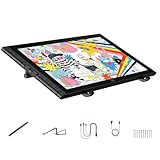
- Revolutionary 16K Magnetic Stylus: Say goodbye to pen wobble and lag. The Artist 16 3rd features the upgraded X4 smart chip stylus. It delivers an unprecedented 16,384 levels of pressure sensitivity with an ultra-low 2g initial activation force and a mere 0.3mm retraction, ensuring smooth, precise lines with zero delay. Plus, the built-in magnetic design allows you to easily attach the pen to the tablet, preventing loss and keeping your workspace tidy
- Anti-Glare Etched Glass and No Parallax: Unlike traditional scratch-prone plastic films, this drawing display features premium AG+AF nano-etched glass. It effectively reduces glare and resists fingerprints while providing a natural, paper-like drawing friction. The fully laminated 15.4-inch FHD display minimizes parallax to almost zero, ensuring the cursor aligns perfectly with your pen tip for true what you see is what you draw accuracy
- Stunning Color Accuracy and OSD Control: Elevate your digital art with a brilliant 99% sRGB, 98% Adobe RGB, and 97% Display P3 color gamut coverage, alongside 16.7 million colors. Enjoy vibrant, true-to-life hues without the color shifting common in other tablets. The built-in OSD (On-Screen Display) color space management allows you to quickly switch profiles and fine-tune colors for professional illustration and animation
- Dual Scroll Wheels and Effortless Workflow: Revolutionize your creative process with 8 customizable shortcut keys and 2 independent scroll wheels. Easily adjust brush sizes, zoom in on the canvas, or scroll through layers without constantly reaching for your keyboard. Furthermore, it includes the S20 foldable stand right out of the box, providing comfortable ergonomic support to prevent neck pain during long drawing sessions
- Clutter-Free Setup and Broad Compatibility: Keep your desk neat by connecting with just one full-featured USB-C to USB-C cable, or use the included 3-in-1 cable for older PCs. This pen tablet is highly versatile, supporting Windows 7 or later, macOS 10.13 or later, Android 10.0 or later, ChromeOS 88 or later, and Linux. It works seamlessly with leading software like Photoshop, Illustrator, Clip Studio Paint, and SAI
V7: Omni Reference
For V7, Midjourney documents Omni Reference as the current workflow for carrying a person, character, object, vehicle, or creature into a new image:
/imagine prompt: The same character riding a train through a floating city --oref IMAGE_URL --ow 100 --ar 16:9Adjust --ow when the reference needs more or less influence. Omni Reference can help preserve reference traits, but it does not guarantee an identical character or perfect costume continuity. It also uses more GPU time than a regular V7 image and currently has limitations with tools such as Vary Region, Pan, and Zoom Out. See Midjourney’s Omni Reference documentation.
V6 and Niji 6: Character Reference
For Midjourney V6 or Niji 6, use --cref and optionally --cw:
/imagine prompt: The same character riding a train through a floating city --cref IMAGE_URL --cw 80 --ar 16:9 --v 6Midjourney directs V7 users toward Omni Reference, while its Character Reference guide documents this older version-specific workflow.
How to keep a consistent comic style
Use the same linework terms, palette, lighting language, model version, stylize value, and aspect-ratio logic across a project. A Style Reference affects overall visual qualities such as color, texture, medium, and lighting; it is not a precise copy of the reference image’s subject.
/imagine prompt: A raccoon detective examining a clue in a rainy alley --sref IMAGE_URL --sw 150 --ar 3:4--sw controls Style Reference strength. Midjourney documents a range of 0–1000 and a default of 100. You can combine references with weights:
Quick wins for a faster PC:
Scan for outdated or missing drivers - takes under a minuteDriver Scan →Repair Windows errors before they cause bigger problemsFix Now →--sref URL1::2 URL2::1Style References work with versions 6 and later, but behavior can vary between versions. Save the exact --sref, --sw, model, and stylize setting. If you are developing a repeatable visual language, Style Creator can generate custom Style Reference codes; its preview images consume GPU time.
Choosing an aspect ratio
--ar 1:1: icons, stickers, and square social posts.--ar 2:3: portrait cards, character sheets, and vertical illustrations.--ar 3:4: portrait-oriented comic panels.--ar 4:5: social artwork and posters.--ar 16:9: cinematic panels, storyboards, and banners.--ar 3:2: landscape scenes and comic spreads.--ar 9:16: mobile comics and vertical webcomic panels.
These are useful starting points rather than guarantees of a particular print standard. When using an Image Prompt, crop the reference to approximately match the intended final ratio where possible. Midjourney explains --ar and image-reference behavior in its parameter documentation and Image Prompt guide.
Fixing common Midjourney comic problems
| Problem | What to change |
|---|---|
| Gibberish lettering | Ask for blank balloons, signs, caption boxes, or empty title space. Add typography afterward. |
| Realistic faces or skin | State “cartoon illustration,” “bold ink outlines,” or “flat cel shading” early; try --raw and --no photorealistic skin. |
| Broken anatomy | Simplify the pose, reduce crowding, request a clear silhouette, and iterate from a stronger composition. |
| Cropped characters | Choose the aspect ratio first and specify “full body,” “three-quarter,” or “head and shoulders.” |
| Inconsistent costumes | Reuse one reference, keep the description identical, and change only one major scene variable. |
| Overcrowded panels | Start with one panel, define foreground/middle ground/background, and request a clear focal character. |
| Muddy black-and-white ink | Add “balanced white areas,” “clear negative space,” and “controlled crosshatching”; specify the light source. |
| Style drift | Reuse a Style Reference and lock palette, linework, model version, and stylize value. |
The --no parameter attempts to exclude unwanted elements, but it is not a guaranteed filter. Likewise, seeds can help compare experiments but should not be treated as a complete character-continuity system.
Rank #4

- Word-first 16K Pressure Levels: The upgraded stylus features 16,384 levels of pressure sensitivity and supports up to 60 degrees of tilt, delivering smoother lines and shading for a natural drawing experience. With no battery or charging needed, it operates like a real pen, making it easy for beginners to create effortlessly. This functionality helps novice artists develop their skills and explore their creativity without the intimidation of complex tools
- Designed for Beginners: This drawing pad desinged with 8 customizable shortcuts for both right and left-hand users, express keys create a highly ergonomic and convenient work platform
- Perfectly Adapted for Android: The XPPen Deco 01 V3 art tablet supports connections with Android devices running version 10.0 and above. It is recommended to download the XPPen Tools Android application, which adapts to your smartphone's screen aspect ratio, ensuring accurate mapping. It also supports mapping on Android screens with different aspect ratios in portrait mode
- Large Drawing Space, Bigger Bold Inspiration: This expansive drawing pad has10 x 6.25-inch helps you break through the limit between shortcut keys and drawing area
- Easy Connectivity for Beginners: The Deco 01 V3 offers USB-C to USB-C connectivity, plus adapters for USB C. This ensures easy connection to various devices, allowing beginner artists to set up quickly and focus on their creativity without compatibility concerns. Whether using a laptop, tablet, or desktop, the Deco 01 V3 provides a seamless experience, making it an ideal choice for those just starting their digital art journey
Templates for custom cartoon art
Single illustration
[character or subject], [action], [setting], [cartoon medium], [linework], [color palette], [lighting], [composition] --ar [ratio] --s [value] --rawComic panel
[character] [action] in [setting], graphic-novel panel, [camera angle], [lighting], [linework], [palette], clear focal point, blank speech balloons --ar [ratio] --s [value]Consistent character scene
[stable character description] doing [new action] in [new setting], [same visual style and palette] --oref [URL] --ow [value] --ar [ratio]Text, lettering, and comic production
Midjourney can attempt captions, sound effects, signs, logos, and title treatments, but generated lettering is not reliably production-ready. A dependable workflow is to generate the artwork with blank balloons, blank signs, or empty title space, then add dialogue, captions, logos, and titles in a layout or design application.
For a polished comic, separate the stages: develop characters and environments, generate panel concepts, rebuild or correct the layout, add lettering, and prepare the final print or digital export. Midjourney is useful for visual development, but it is not a deterministic comic-production pipeline.
Which Midjourney version should you use?
As checked on August 18, 2026, Midjourney identifies V8.1 as the default model. Midjourney says V8.1 supports Raw mode, HD images, Style References, Personalization, and other current controls. It also states that standard V8.1 jobs render approximately four to five times faster than earlier versions; that is Midjourney’s claim, not independent performance testing. Confirm the current model before using version-specific parameters.
Use V7 when you need its Omni Reference workflow. Use V6 or Niji 6 when following the documented Character Reference workflow. Niji modes may produce a different anime- and manga-oriented visual direction, so do not assume that a prompt will behave identically across models.
For more information, see Midjourney’s version guide.
Recommended Free Tools
Using references responsibly
Submit images you own, have permission to use, or are otherwise authorized to provide. Avoid uploading private personal images or copyrighted artwork merely to imitate its style. Describe observable qualities—such as contour weight, palette, printing texture, crosshatching, or cel shading—rather than relying on a living artist’s name. For questions about rights, review current Midjourney terms and applicable law in your jurisdiction.
Is Midjourney suitable for a comic project?
It can be a strong fit for concept art, character exploration, environment design, cover concepts, and visual brainstorming. A subscription is more useful when you need many variations or repeated reference-based generations. Midjourney’s official plan page lists Basic, Standard, Pro, and Mega tiers, with Stealth Mode available on Pro and Mega; prices and features can change, so verify them at the official plan comparison.
Basic is the sensible starting point for occasional experimentation. Standard suits heavier generation and concept development. Pro is relevant when private generations or greater capacity matter. Mega is intended for the highest listed capacity. None of these tiers removes the need for lettering, layout, cleanup, or continuity work in a finished comic.
Frequently Asked Questions
Can Midjourney make a full comic page?
It can create page-layout concepts and multi-panel experiments, but borders, character continuity, panel pacing, and lettering may need to be rebuilt or corrected before publication.
The Tool Desk
Outbyte Driver Updater FREEFix the driver behind crashes, sound loss and screen glitchesFind Drivers →Outbyte PC Repair FREEClear out junk files and repair common Windows errorsFree Scan →Best Value

- PLEASE NOTE: The XPPen Artist 15.6 Pro V2 needs to connect with a computer to use. You need to use it with your Computer or Laptop. The 3 in 1 cable is included
- 16K Pressure Sensitive: XPPen Artist 15.6 Pro V2 drawing tablet introducing X3 Pro smart chip stylus, which has 16384 pressure levels, 100%* higher than that of its peers. It delivers much more precise and smoother lines than ever before, excelling at hyper-nuanced creation, a game-changer in details
- Easy Control, One Red Dial for All: The innovative Red Dial interface is designed for a smooth workflow and optimal efficiency, allowing illustrators or designers to master essential controls such as brush size, navigation, and zoom In/Out. It fits comfortably in your hand and ensures a natural hand position, reducing wrist strain during prolonged use
- Full Laminated Anti-glare Screen: The 15.4-inch graphic art tablet adopts full laminated technology, anti-glare etched glass, and a wide angle of 178°, which will help you avoid parallax errors between the stylus nib and cursor, precisely positioning every single one of your strokes
- 8 customized express keys: The Artist 15.6 Pro V2 drawing display features 8 fully customizable shortcut keys and puts more customization options at your fingertips to suit your preferred work style, allowing you to capture and express your ideas easier and faster for optimized workflow
How do I make cartoon images less realistic?
Use concrete medium terms such as “cartoon illustration,” “bold ink outlines,” “flat cel shading,” and “limited palette.” Try lower stylization or Raw mode, and use a restrained exclusion such as --no photorealistic skin.
What is the difference between --sref and --oref?
--sref influences a reference image’s overall visual feel. V7’s --oref carries a person, character, object, vehicle, or creature into a new image. Neither guarantees an exact copy.
Should I use V8.1, V7, V6, or Niji?
Choose V8.1 for the current default workflow, V7 when using Omni Reference, and V6 or Niji 6 when following Character Reference instructions. Niji can produce a different manga-oriented result, so test the version that matches your project.
How do I get readable comic text?
Do not depend on generated dialogue or titles. Ask for blank balloons and empty title areas, then add the lettering in a layout or design application.
What aspect ratio is best for a comic panel?
Start with 3:4 for a portrait panel, 16:9 for a wide cinematic panel, 3:2 for a landscape spread, and 9:16 for a vertical mobile panel.
Can these prompts be used for children’s books, posters, or manga-inspired art?
Yes. Replace the subject, audience, palette, linework, and composition while keeping the same prompt structure. Treat each result as an adaptable visual starting point.
How do I avoid copying another artist’s style?
Describe visible characteristics—line weight, color limits, texture, lighting, and printing method—instead of asking for an exact imitation of a named living artist.
What should I do with generated lettering?
Use it only when imperfect text is acceptable in a concept draft. For a public-facing comic or cover, replace it with manually typeset text.
Quick Recap

Product prices and availability are accurate as of the date/time indicated and are subject to change. Any price and availability information displayed on Amazon at the time of purchase will apply.




