The Tool Desk
Recommended Free Tools
Outbyte Driver Updater FREEScan for outdated or missing drivers - takes under a minuteDriver Scan →Outbyte PC Repair FREERepair Windows errors before they cause bigger problemsFix Now →
ThatPainter is reader-supported. When you buy through links on our site, we may earn an affiliate commission. Learn More
To download and apply a font on a Samsung Galaxy, open Settings → Display → Font size and style → Font style → Download fonts. Galaxy Store opens; check the font’s listing for its price before installing, since Samsung’s support instructions do not say that every available font is free.
After installation, return to Font style and select the downloaded font. Menu names and screens can vary by device model, software version, and wireless service provider.
Download and apply a font on your Samsung Galaxy
- Open Settings and tap Display.
- Tap Font size and style.
- Tap Font style, then Download fonts. Galaxy Store opens.
- Browse the available fonts and check the listing price. Install the font you want if it is free or you choose to buy it.
- Return to Font style settings and select the downloaded font to apply it.
These steps follow Samsung’s font size and style support guide. If you cannot find the menu, search Settings for Font size and style. Available screens and settings may vary by wireless service provider, software version, and device model, as Samsung’s US support guide notes.
How to check whether a font is free
Samsung’s instructions describe how to browse and download fonts, but do not establish that every Galaxy Store font is free. Open the font’s listing and check its displayed price before installing. A mobile-data charge, if applicable under your plan, is separate from the font’s price.
#1 Best Overall

- Compatibility:The S Pen Only Compatible for Samsung Galaxy S25 Ultra 5G All Versions.SM-S938B, SM-S938B/DS, SM-S938U, SM-S938U1, SM-S938W, SM-S938N, SM-S9380, SM-S938E, SM-S938E/DS
- Product Feature: 1.5mm Pen Tip, 4096 level pressure sensing, precise strokes, creating pressure free. You can use it to sketch or doodle, as you like.
- Use: You can take quick notes, draw or edit with all the other typical touch screens.
- Wonderful Shading Experience: A sharper pen tip and an improved design let you approach the screen at a perfect angle for ultra-precise tilting,shading.
- Package Includes:1 * S Pen for Galaxy S25 Ultra.
Useful font settings and download tip
You can adjust Font size and boldness in the same settings area. High contrast font options may be found under Accessibility settings, and labels can vary by software version and region.
Samsung advises that downloading over a mobile network may incur charges depending on your data plan. For large downloads, use Wi-Fi if available.
Rank #2

- Compatibility:The S Pen Only Compatible for Samsung Galaxy S25 Ultra 5G All Versions.SM-S938B, SM-S938B/DS, SM-S938U, SM-S938U1, SM-S938W, SM-S938N, SM-S9380, SM-S938E, SM-S938E/DS
- Product Feature: 1.5mm Pen Tip, 4096 level pressure sensing, precise strokes, creating pressure free. You can use it to sketch or doodle, as you like.
- Use: You can take quick notes, draw or edit with all the other typical touch screens.
- Wonderful Shading Experience: A sharper pen tip and an improved design let you approach the screen at a perfect angle for ultra-precise tilting,shading.
- Package Includes:1 * S Pen for Galaxy S25 Ultra.
FAQ
Where do I download fonts on a Samsung Galaxy?
Go to Settings → Display → Font size and style → Font style → Download fonts. This opens Galaxy Store.
How do I apply a font after downloading it?
Return to Font style settings and select the downloaded font.
Rank #3

- FINE PRECISION. POINTIED PRESSURE: Let loose your world, thoughts, and imaginations at the fine tip of the Galaxy S25 Ultra S Pen.¹ Sketch, scribble, and make whatever you wish.
- HANDY TOOLS, ALL AT YOUR SERVICE: Instantly have at your service an array of tools via Air Command. From sketching to note-taking — you name it, you’ve got it.
- DEVICE COMPATIBILITY: The Samsung Galaxy S25 Ultra S Pen is compatible with the Samsung Galaxy S25 Ultra cell phone (sold separately.)
Are all Samsung Galaxy Store fonts free?
Samsung’s support directions do not verify that every listing is free. Check the listing price before installing.
What if I cannot find Font size and style?
Search Settings for Font size and style. The available screens and settings may vary by device model, software version, and wireless service provider.
Quick Recap
Rank #4
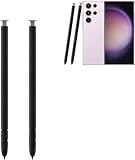
- The galaxy s23 ultra pen stylus withoutbluetooth. The galaxy s23 ultra stylus S pen stylus cannot support remote control
- Work for: The galaxy s23 ultra pen stylus is fit for Samsung Galaxy S23 Ultra 5G
- High Quality: The galaxy s23 ultra pen soft tips with 4096 4096 levels of pressure sensitivity, you can write precisely and smoothly.
- Wide Application: The galaxy s23 ultra stylus pen helps in daily use, writing, painting etc. And it does no harm to your screen.
- Package Includes:2 X Galaxy S23 Ultra Pen Replacement(withoutBluetooth)

Product prices and availability are accurate as of the date/time indicated and are subject to change. Any price and availability information displayed on Amazon at the time of purchase will apply.




