What’s actually slowing this PC down?
Pick the symptom - the matching free tool is one click away.
ThatPainter is reader-supported. When you buy through links on our site, we may earn an affiliate commission. Learn More
As an Amazon Associate I earn from qualifying purchases.
For smooth machine-sewn circles, turn the fabric in small increments rather than making one large turn. With a straight stitch, pivot every few stitches; with a zigzag, stop when the needle is on its right-hand swing, lift the presser foot slightly, and turn the fabric gently. Work slowly through either method.
Quick wins for a faster PC:
Clear out junk files and repair common Windows errorsFree Scan →Scan for outdated or missing drivers - takes under a minuteDriver Scan →Repair Windows errors before they cause bigger problemsFix Now →Pivoting a circle with a straight stitch
Sew a few stitches along the circle, then make a small pivot. Repeat that pattern as you follow the outline. Jennifer, the presenter of AllPeopleQuilt’s “Machine Minute – Perfect Pivots”, puts it this way: “If you’re doing a straight stitch, the secret is to pivot every few stitches ever so slightly.” Frequent, slight adjustments help you follow the curve without forcing the fabric around a sharp turn.
#1 Best Overall

- 27 Unique Built-in Stitches: The Brother XM2701 sewing machine includes 27 built-in stitches including decorative, blind hem, zigzag, and stretch stitches and an auto-size buttonhole
- Automatic Needle Threader and Drop-in Top Bobbin: This beginner sewing machine is also great for experienced users; it includes an automatic needle threader that perfectly pushes thread through the needle and a convenient, jam resistant drop-in top bobbin
- Included Accessories: The XM2701 comes with 6 sewing feet, 3-piece needle set, twin needle, 4 bobbins, manual and more
- Versatile Free Arm: This free arm sewing machine is a simple sewing machine, perfect for a wide range of everyday sewing projects, and users from beginners to advanced
- At Your Side Support: The XM2701 small sewing machine comes with Brother At your side support offering free technical support via online, live chat or phone for the life of your machine
Pivoting a circle with a zigzag stitch
- Sew along the circle and slow down as you approach the point where you want to turn.
- Stop with the needle on the right-hand swing of the zigzag.
- Raise the presser foot just enough to free the fabric for a slight turn.
- Turn the fabric gently, lower the presser foot, and continue stitching.
- Repeat the sequence around the circle, keeping each adjustment small.
Keep the stitched circle controlled
Avoid trying to rotate the fabric through a large section of the curve at one stop. Small turns let you stay closer to the circle outline; working slowly gives you time to make each adjustment without pulling or forcing the layers.
The AllPeopleQuilt demonstration uses fabric, batting, and backing, with the stitched circles intended to be cut out as ornaments. If you are following that example, keep the stitching inside the drawn circle so the seam remains within the piece when you cut it out.
Rank #2

- 17 built-in stitches
- 4-step buttonhole style
- Reverse button
- Free arm for sewing
- LED lighting for the work area
Do you need a Baby Lock Symphony?
No particular machine model is established as necessary. The episode introduces Baby Lock and names its Symphony machine, but the pivot methods depend on using a straight or zigzag stitch and the relevant needle position, not on that specific model. Use a machine with the stitch you plan to sew.
Quick Recap
Rank #3
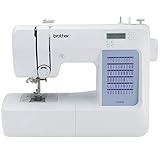
- 60 UNIQUE BUILT-IN STITCHES: The Brother CS5055 sewing machine includes 60 built-in stitches including utility, decorative and heirloom stitch functions, and 7 1-step auto-size buttonholes
- IMPROVED NEEDLE THREADER: Easier than ever to use, the automatic needle threader reliably pushes the thread through the needle. The convenient, jam resistant drop-in top bobbin easy to load and helps ensure your bobbin stays in place
- INCLUDED ACCESSORIES: The CS5055 includes 7 sewing feet, 4 bobbins, a needle set, a trilingual English/Spanish/French user manual and more
- METAL FRAME and FIXED NEEDLE BAR: The durable metal frame construction allows your machine to tackle any project, and the needle is fixed in place while you work, allowing for cleaner stitching and even lines
- LARGE NEEDLE-TO-ARM WORKSPACE: A larger workspace with increased width in needle-to-arm space allows users to work on larger projects

Product prices and availability are accurate as of the date/time indicated and are subject to change. Any price and availability information displayed on Amazon at the time of purchase will apply.




