What’s actually slowing this PC down?
Pick the symptom - the matching free tool is one click away.
ThatPainter is reader-supported. When you buy through links on our site, we may earn an affiliate commission. Learn More
If your sewing machine is breaking thread, making loops, skipping stitches, or puckering fabric, check threading, the bobbin, and the needle before turning the tension dial. Several setup problems can produce similar symptoms, and the right tension depends on your machine, stitch, fabric, and thread. This guide covers sewing-machine tension; if you meant roller-shade tension, these steps do not apply.
Start with the setup, not the tension dial
Before adjusting tension, rethread the machine according to its manual, check that the bobbin is inserted and threaded correctly, and inspect the needle. Confirm that the needle type and size suit your fabric and thread. Lint, an unsuitable stitch length, or thread caught at the spool holder can also cause problems that resemble incorrect tension. JUKI’s HZL-HT710 instruction manual and Singer India’s troubleshooting guidance both describe causes beyond the tension setting.
There is no universal dial number: JUKI says, “There is no single tension setting appropriate for all the stitch functions and fabrics.” Its HZL-HT710 manual gives 4 as that model’s basic setting, not a general setting for other machines. Find the baseline and adjustment directions in your own model’s manual.
Recommended Free Tools
#1 Best Overall

- 27 Unique Built-in Stitches: The Brother XM2701 sewing machine includes 27 built-in stitches including decorative, blind hem, zigzag, and stretch stitches and an auto-size buttonhole
- Automatic Needle Threader and Drop-in Top Bobbin: This beginner sewing machine is also great for experienced users; it includes an automatic needle threader that perfectly pushes thread through the needle and a convenient, jam resistant drop-in top bobbin
- Included Accessories: The XM2701 comes with 6 sewing feet, 3-piece needle set, twin needle, 4 bobbins, manual and more
- Versatile Free Arm: This free arm sewing machine is a simple sewing machine, perfect for a wide range of everyday sewing projects, and users from beginners to advanced
- At Your Side Support: The XM2701 small sewing machine comes with Brother At your side support offering free technical support via online, live chat or phone for the life of your machine
Troubleshoot by symptom
Upper thread breaks
- Rethread the upper thread using the path shown in your machine’s manual.
- Check whether the upper tension is too tight. On the JUKI HZL-HT710, the manual says to reduce the setting if tension is too tight; confirm the direction for your machine.
- Check that the thread is appropriate for the needle, that the needle is correctly installed and undamaged, and that thread has not wound around the spool-holder pin. Replace a damaged needle.
These are possible causes identified in the JUKI HZL-HT710 manual. A breaking upper thread does not, by itself, mean the bobbin tension needs adjustment.
Bobbin thread breaks
Check that the bobbin is correctly threaded and that the bobbin case is properly inserted. Singer India also lists lint in the bobbin case and a damaged bobbin that does not turn smoothly as possible causes. Use your machine’s bobbin diagram before considering any lower-tension adjustment. See the JUKI manual and Singer India support.
Rank #2

- 17 built-in stitches
- 4-step buttonhole style
- Reverse button
- Free arm for sewing
- LED lighting for the work area
Stitches skip
Inspect the needle for damage and correct installation, and check that its type and size suit the thread and fabric. Make sure the presser foot is attached correctly and the upper thread is routed as shown in the manual. Needle or threading problems can cause skipped stitches; the symptom alone does not establish that tension is wrong. Both the JUKI manual and Singer India’s guidance include these checks.
Loose stitches or loops
Check the upper-thread path and bobbin setup first, then inspect whether the needle, thread, and fabric are a suitable match. If you adjust tension, use the baseline and direction specified for your machine and stitch. Do not assume that loops always call for changing bobbin tension; first identify which thread path or setup may be contributing.
Free tools Windows power users keep installed
One-click scans. No signup required.
Rank #3
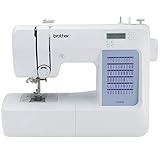
- 60 UNIQUE BUILT-IN STITCHES: The Brother CS5055 sewing machine includes 60 built-in stitches including utility, decorative and heirloom stitch functions, and 7 1-step auto-size buttonholes
- IMPROVED NEEDLE THREADER: Easier than ever to use, the automatic needle threader reliably pushes the thread through the needle. The convenient, jam resistant drop-in top bobbin easy to load and helps ensure your bobbin stays in place
- INCLUDED ACCESSORIES: The CS5055 includes 7 sewing feet, 4 bobbins, a needle set, a trilingual English/Spanish/French user manual and more
- METAL FRAME and FIXED NEEDLE BAR: The durable metal frame construction allows your machine to tackle any project, and the needle is fixed in place while you work, allowing for cleaner stitching and even lines
- LARGE NEEDLE-TO-ARM WORKSPACE: A larger workspace with increased width in needle-to-arm space allows users to work on larger projects
Fabric puckers or gathers
Check threading and needle suitability, then review the machine’s tension and stitch-length settings. JUKI lists an unsuitable needle size and stitch length among possible causes of puckering; for thin fabric, its manual suggests using stabilizer underneath. Singer India also lists incorrect threading and stitch length as possible causes of gathered or puckered seams. Consult the JUKI manual or Singer India support for the relevant checks.
Independent reader supportYour contribution helps us test, update, and keep practical guides available for everyone.Test adjustments on a matching scrap
- Use a scrap of the same fabric and the same thread as your project.
- Sew a test seam using the same stitch and comparable fabric layers.
- Change one setting at a time so you can tell what improved or worsened the stitch.
- Check the result and, if needed, adjust tension, stitch length, or stitch width according to your machine’s manual.
JUKI recommends trial sewing under matching conditions and checking tension, stitch length, and width. If the problem continues after the manual-directed checks, contact your machine’s dealer or local service center, as advised in the JUKI manual.
Quick Recap

Product prices and availability are accurate as of the date/time indicated and are subject to change. Any price and availability information displayed on Amazon at the time of purchase will apply.




